DDWRT VPN Routers make an excellent second layer of security for any business or home network. Running the VPN directly from the router also allows one to connect unlimited devices to the secure VPN, even devices that may not normally support VPN usage. This raises the question, what happens if the router’s VPN accidentally disconnects or drops the VPN connection? Luckily DDWRT offers a handy Connection Watchdog feature (also known as Keep Alive) that monitors the router’s up-time and completely reboots the VPN in the event of a connection issue.
First, we must make it clear: TorGuard offers high quality VPN services and prides itself on stability, speed and performance across its VPN network. Both OpenVPN and PPTP services are extremely stable and will stay connected for weeks on end without interruption. Unfortunately, the PPTP VPN protocol is known for occasional disconnects even when running on the most stable and fast servers. This is where DDWRT’s connection watchdog can come in handy…
How to enable Connection Watchdog / Keep Alive
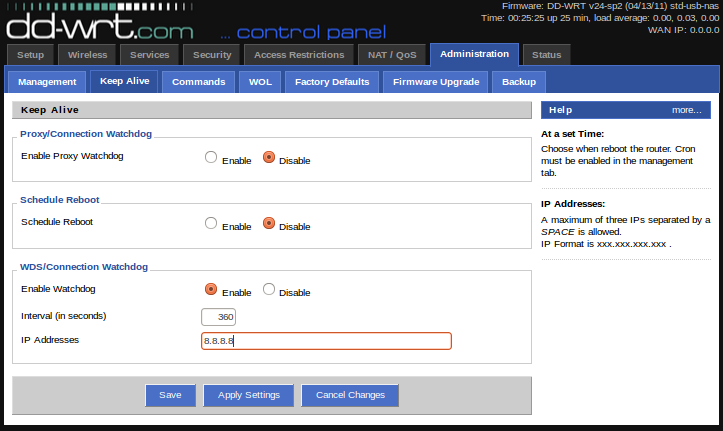
Enabling this security feature on one’s DDWRT VPN router is very easy. First, navigate to the DDWRT control panel (usually 192.168.1.1). Click the “Administration” tab, then click the “Keep Alive” tab. Under WDS/Connection watchdog select enable. For interval, 360 seconds is a great interval to check for connectivity. For IP address, enter Google’s IP “8.8.8.8” and then click the apply settings button at the bottom of the screen.
That is it, Keep Alive is now active. With this setting enabled every 360 seconds the router will check Google’s server (8.8.8.8). If it receives a response then no action is taken. If the router is unable to contact the server, the router is immediately rebooted thus re-establishing the VPN connection on the router.
This feature is a great idea to have enabled if you are running VPN service on a DDWRT router. No more dropped connections since the router will automatically re-establish a fresh connection should there be any disconnection. Visit the TorGuard Router store for a complete selection of DDWRT and Tomato pre-flashed VPN routers: