At roughly $55, the Linksys E1200 is definitely one of the most affordable in TorGuard’s lineup of DDWRT enabled VPN Routers. This router is very simple and features everything you need to get started when using Anonymous VPN service on your router. While it may not have some of the larger bells and whistles of the e3000, it makes up for it in it’s small size and easy setup process.
The Linksys E1200 Wireless-N Router offers fast speed and reliable range so you can create a powerful wireless home or office network. It connects computers, wireless printers, and other Wi-Fi devices at speeds up to 300Mbps. The WPA/WPA2 encryption and SPI firewall help keep your network protected from virus and hackers by enhancing security settings. TorGuard has Pre-Flashed this Router with powerful DDWRT management software that gets you up and running in a few simple steps and offers powerful tools for managing your wireless network. You can establish a separate guest network and limit Internet access using Parental Controls, and access-advanced settings. The MIMO antenna technology provides a wide coverage of wireless connection. Your computers, wireless printers, smart phones, and other wireless devices can be connected instantly at a transfer speed of 300Mbps. When using this powerful Wireless-N router, surfing, emailing, and printing wirelessly is an easy process. We’ve also added powerful VPN service options to this DDWRT Router to allow for easy, plug and play OpenVPN service with TorGuard. Secure an unlimited number of devices with a high speed VPN Router and encrypt all your network traffic with military grade security. Every router comes with 30 days FREE VPN service from TorGuard.

How easy is it to setup your TorGuard Router?
It’s so easy, we’ll show you how in just a few steps.
Step 1.) Order a DDWRT VPN Router from TorGuard’s Online Store
Step 2.) Receive package, plug in the router to your current router or modem. Restart both routers (and modem)
Step 3.) Open a web browser and navigate to: http://192.168.1.1/Status_OpenVPN.asp
Refresh this screen to see the latest OpenVPN connection output and log. After a few moments, you should see the message “Connected: Success” as seen in the screenshot below:
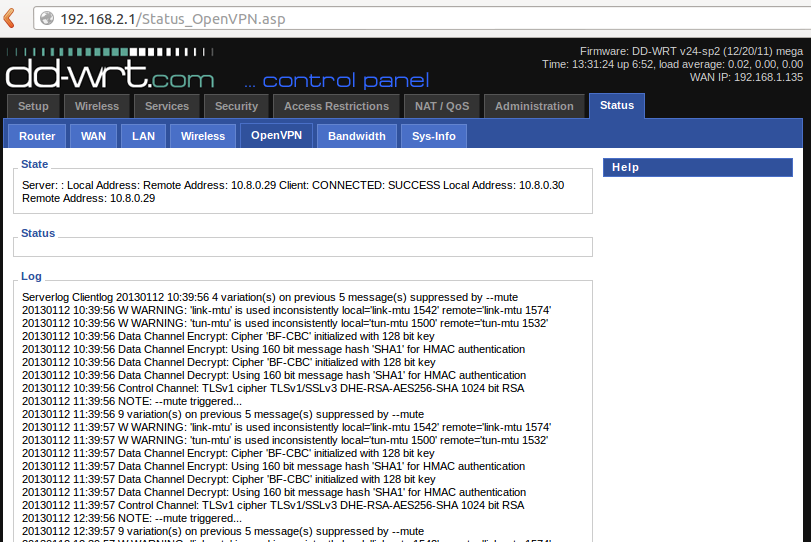
Your Connected! For a complete walkthrough on how to setup your DDWRT enabled Router with TorGuard VPN Service, visit our Step by step tutorial in our Knowledgebase.