
In an age where privacy is a commodity, Virtual Private Networks (VPNs) serve as a crucial line of defense for those seeking to protect their online presence. While reputable VPNs like TorGuard commit to a no-logs policy, ensuring user activity remains untracked, it's vital to recognize that the websites you visit might not be as discreet. These platforms can deanonymize users through trackers and cookies, underscoring the importance of being vigilant about the digital traces we leave behind.
The volume of data individuals generate online is staggering, posing significant risks to personal privacy and freedom. Many users, perhaps without fully understanding the implications, consent to terms of service and privacy policies with a simple click on "I agree." This action may inadvertently expose sensitive information such as IP addresses, device IDs, and geographical locations, which, contrary to common belief, can be linked back to them. Without proper precautions, this could lead to the compilation of a detailed profile encompassing one's identity, past whereabouts, and online interactions.
For those who understand the potential perils of the internet, VPNs are a popular solution for evading invasive tracking and safeguarding personal data. However, not all VPNs are created equal. Some may unwittingly aid data brokers in creating comprehensive profiles based on users' IP browsing activities, facilitated by tracking scripts and cookies embedded in widely used websites and mobile apps. Previously, we delved into the VPN industry's hidden connections with data brokers, shedding light on the threat to privacy posed by extensive data collection, and providing practical advice for protecting one's digital footprint.
Today, we reintroduce the "Blacklight" test—a tool designed to reveal the extent of invasive tracking employed by websites. This test serves as an eye-opener, highlighting the need for robust privacy measures and informed choices regarding VPN services.

🔍What is the Blacklight Test?🍪
On the internet, where every click and scroll can be monitored, the Blacklight Test is an extremely useful tool for those who value privacy. Imagine a tool so adept that with just a URL, it can unveil the invisible watchers tracking your online journey. Blacklight is precisely that—a real-time website privacy inspector designed to expose the myriad of tracking technologies that websites deploy to monitor user behavior.
When you enter a website's URL into Blacklight, it acts on your behalf, simulating the experience of a user navigating the site. Utilizing a headless browser equipped with The Markup's custom software, Blacklight diligently scans the site for privacy infringements. This innovative tool identifies potential surveillance activities by conducting seven distinct tests, each targeting a specific form of user tracking or privacy violation.
The surveillance techniques Blacklight aims to detect include, but are not limited to:
- Third-party cookies: These are created by domains other than the one you are directly visiting, often used for tracking across multiple sites.
- Ad trackers: Employed to observe your browsing habits to tailor advertisements more effectively.
- Key logging: Captures and records user keystrokes, potentially including sensitive information.
- Session recording: Records entire browsing sessions, including mouse movements and clicks.
- Canvas fingerprinting: Utilizes the HTML5 canvas element to identify and track devices uniquely.
- Facebook tracking: Specific to tracking that leverages Facebook's technologies and networks.
- Google Analytics: Google's widely used analytics tool that tracks and reports website traffic.
- Remarketing Audiences: Targets previous visitors with targeted ads when they visit other sites on the internet.
By identifying these tracking mechanisms, Blacklight provides an instant analysis of a website's privacy practices, offering valuable insights into who might be collecting your data and how your online activities are being monitored. This tool not only aids users in understanding the privacy implications of their web browsing but also empowers them to make informed decisions about their online privacy.
Things Look Different Under the Blacklight
We ran the Blacklight test on some of the most popular VPN providers and websites. Here are the results:
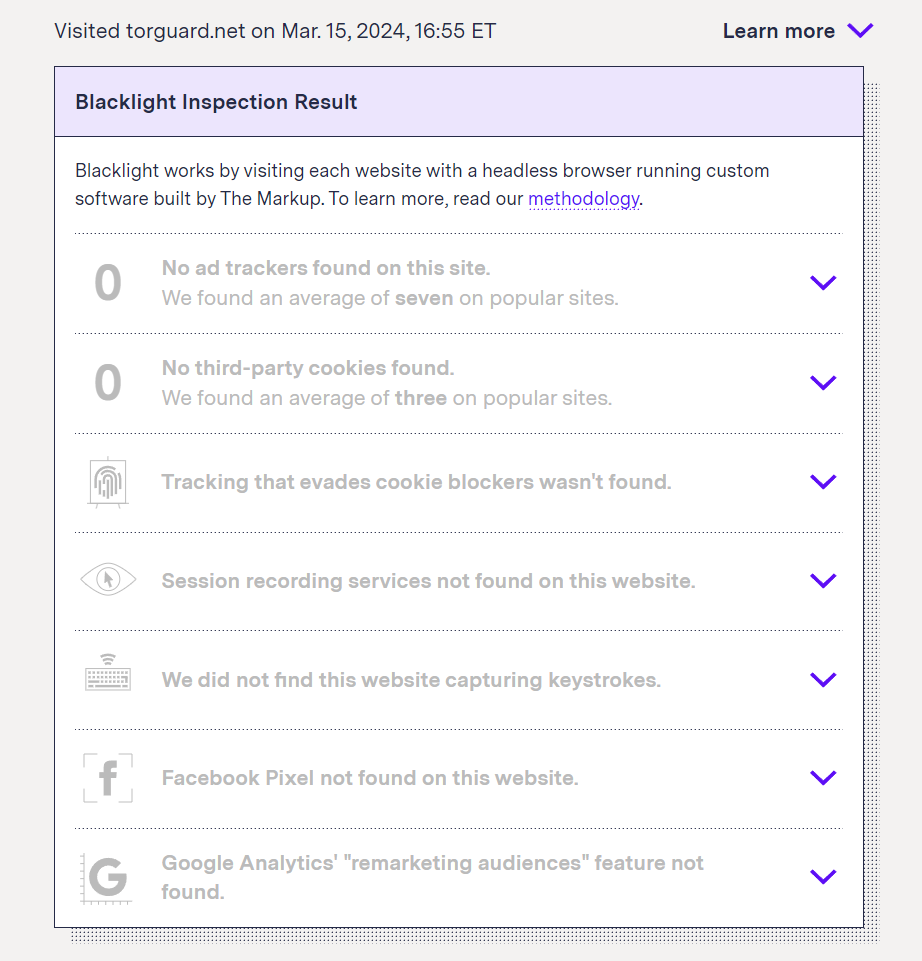
TorGuard
- Findings: Zero trackers or third-party cookies.
Note: We commend PrivateInternetAccess, ProtonVPN, ivpn.net, and Mullvad for also having zero trackers and cookies. 🫡
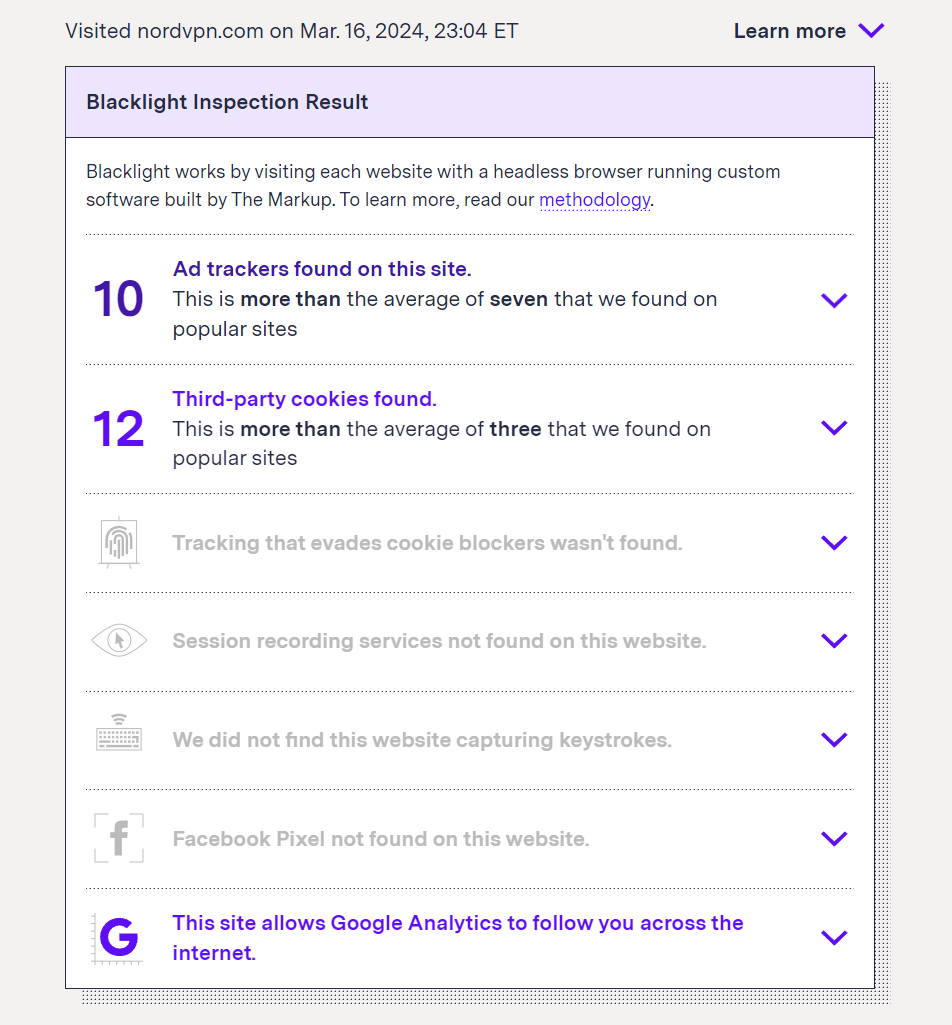
NordVPN
- Findings: 10 ad trackers, 12 third-party cookies, Google Analytics tracking.
- Details: Tracking scripts from Index Exchange, Inc., Flashtalking Inc, Alphabet, Inc., The Trade Desk Inc, IPONWEB GmbH, Magnite, Inc., and Microsoft Corporation were detected.
ExpressVPN
- Findings: The website blocks Blacklight, utilizes Facebook "locale" cookie.
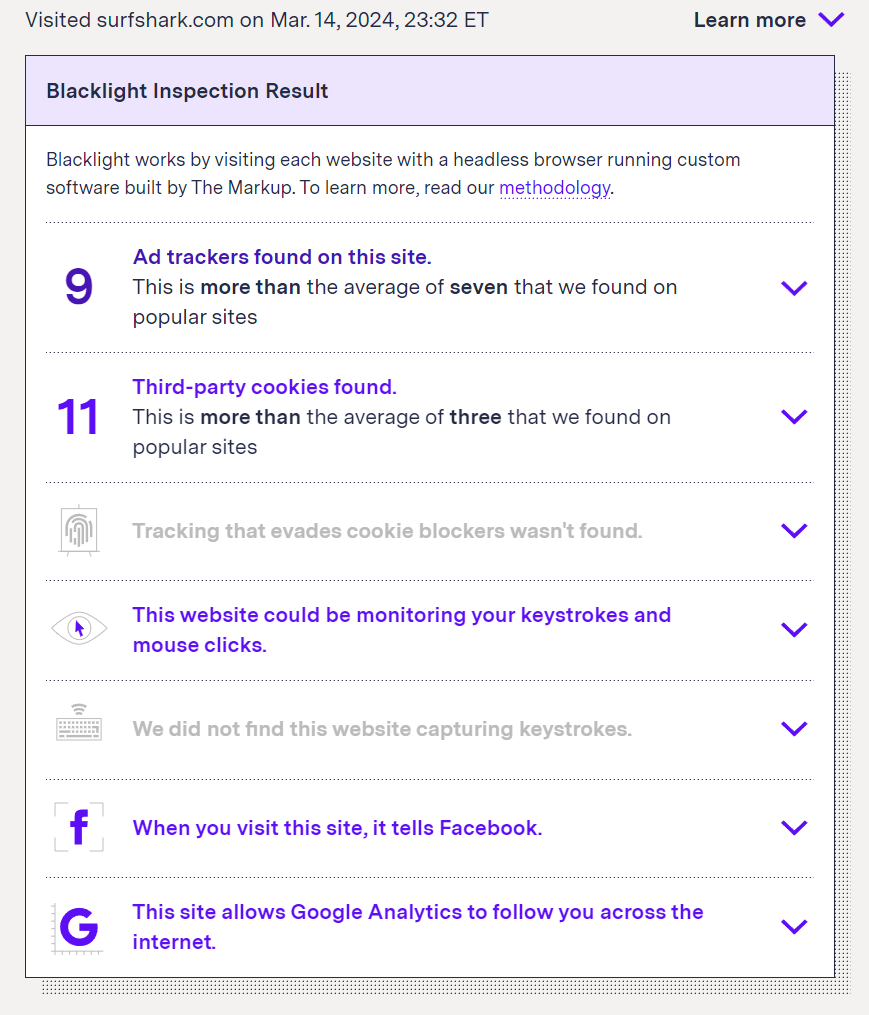
SurfShark
- Findings: 9 ad trackers, 11 third-party cookies, potential keystroke/mouse monitoring, Facebook pixel, Google Analytics tracking.
- Details: Scripts from Alphabet, Inc., Facebook, Inc., and Twitter, Inc. were detected.
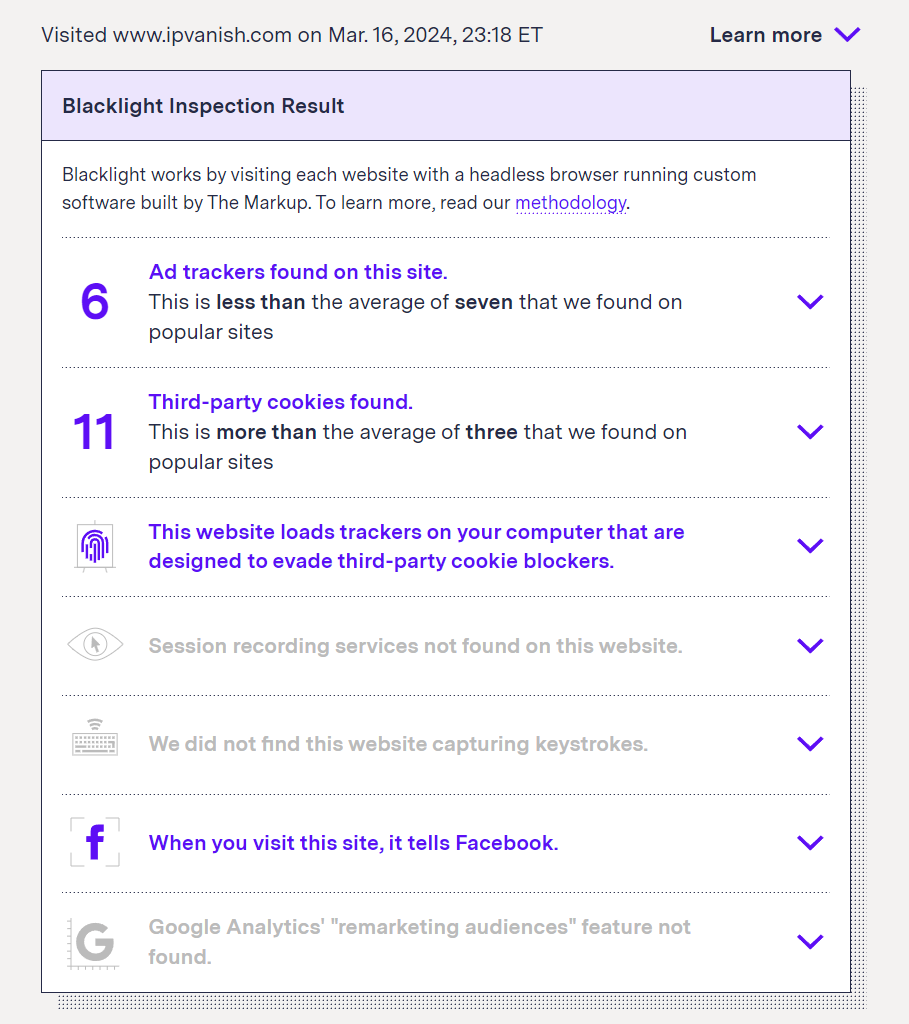
IPvanish
- Findings: 6 ad trackers, 11 third-party cookies, Canvas Fingerprinting, Facebook Pixel.
- Details: Scripts from Alphabet, Inc., Microsoft Corporation, Facebook, Inc., and detection of Canvas Fingerprinting, which is a technique used to track users across sites.
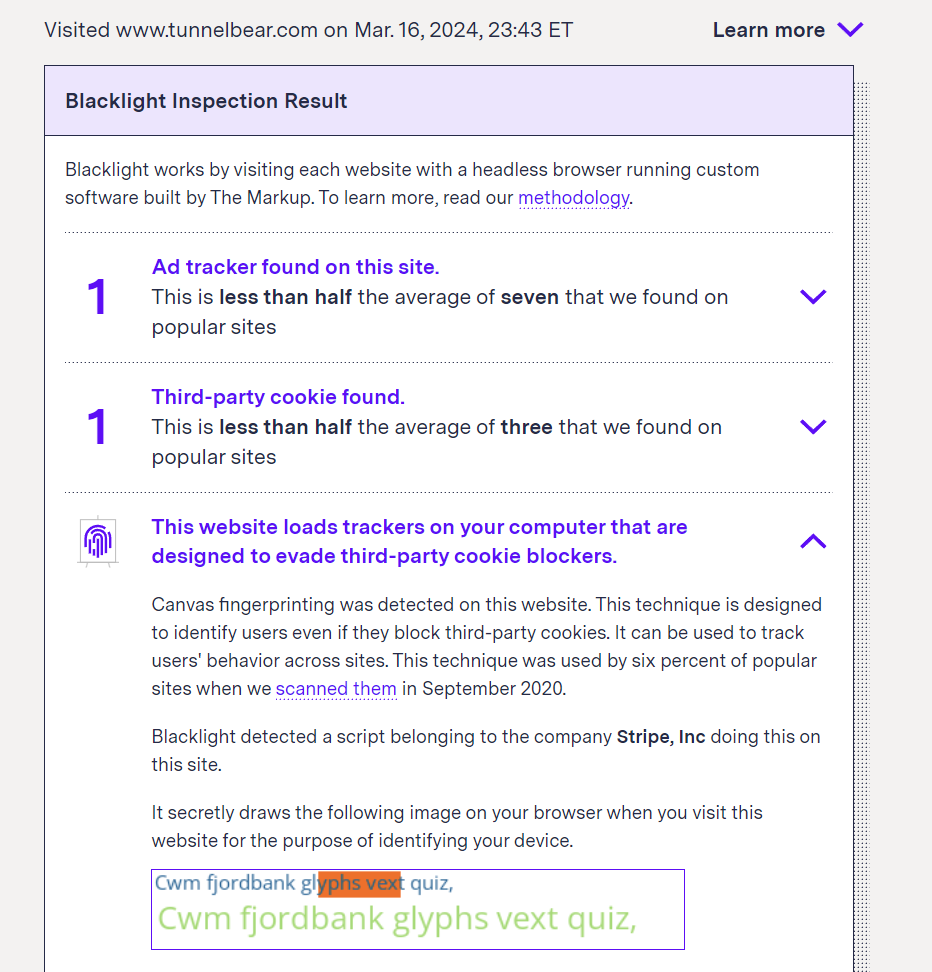
TunnelBear
- Findings: 1 ad tracker, 1 third-party cookie, Canvas fingerprinting.
- Details: Canvas fingerprinting was detected, associated with Stripe.
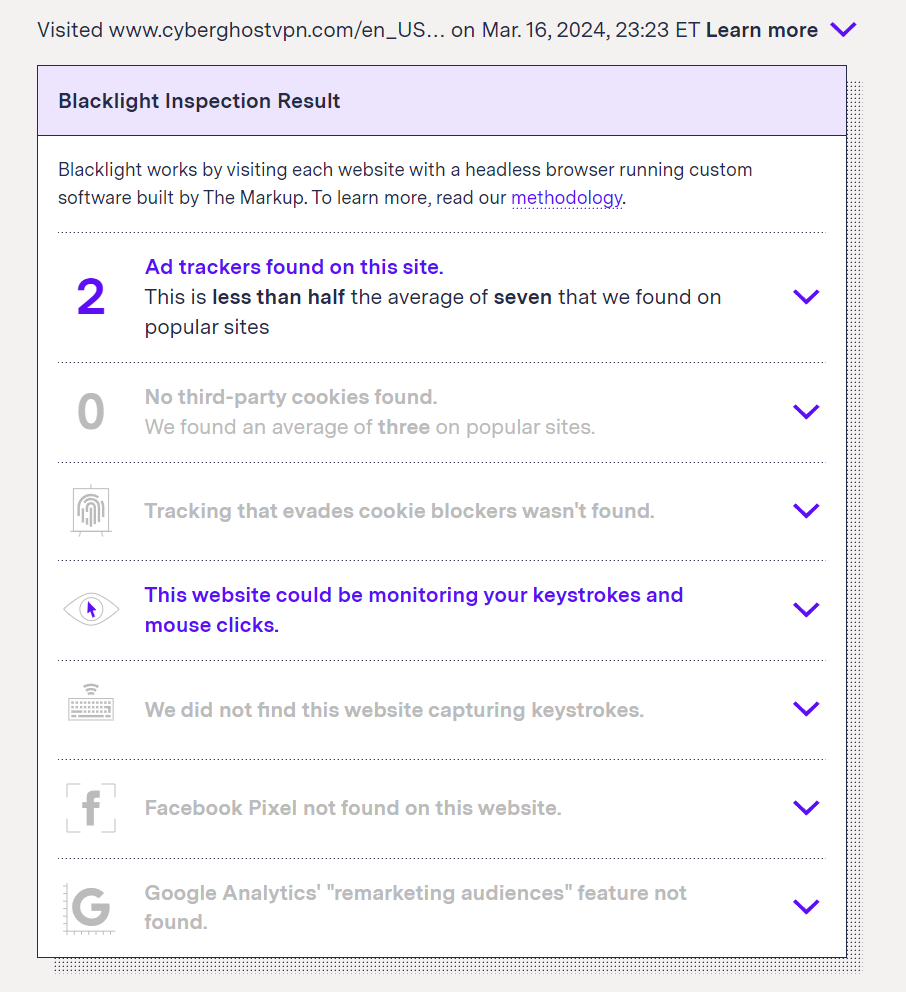
CyberghostVPN
- Findings: 3 ad trackers, 2 third-party cookies, possible keystroke/mouse monitoring.
- Details: Scripts from Mouseflow and Alphabet, Inc. were detected.
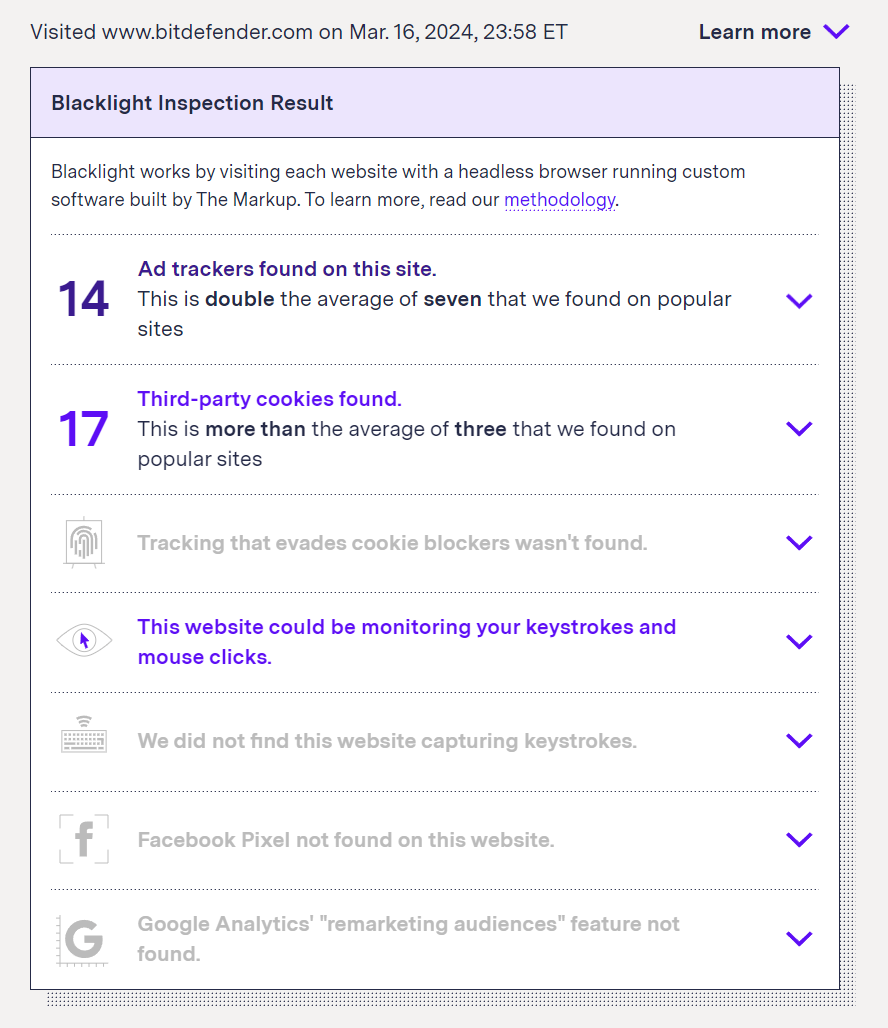
BitDefender
- Findings: 14 ad trackers, 17 third-party cookies.
- Details: Trackers and scripts from various companies including Alphabet, Inc., Adobe Inc., and Microsoft Corporation were detected, along with third-party cookies from Merkle Inc, Index Exchange, Inc. and Alphabet, Inc., Twitter, Inc., Merkle Inc, Demandbase, Inc., Telaria, Index Exchange, Inc., and Magnite, Inc.
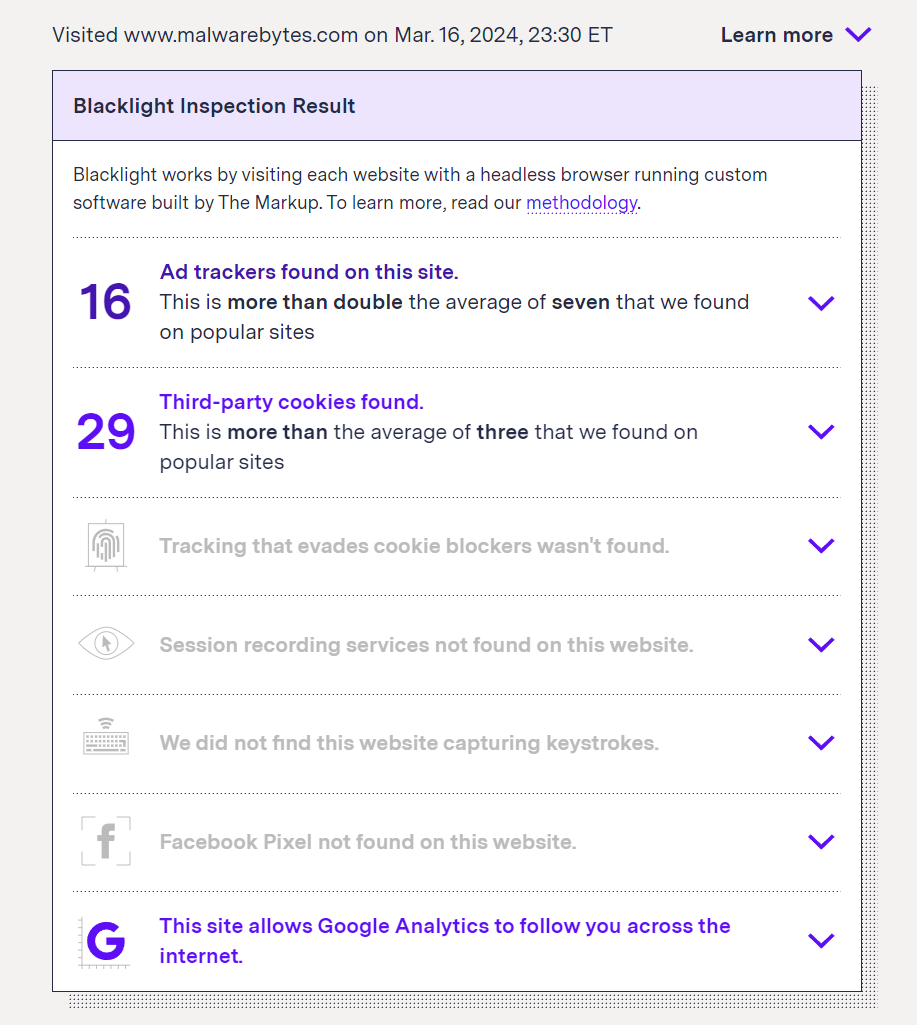
Malwarebytes
- Findings: 16 ad trackers, 29 third-party cookies, Google Analytics tracking.
- Details: Detected scripts and cookies from companies such as Demandbase, Inc. and Twitter, Inc., Microsoft Corporation, Alphabet, Inc., Adobe Inc., LiveRamp Holdings, Inc., Telaria, Index Exchange, Inc., and Magnite, Inc.
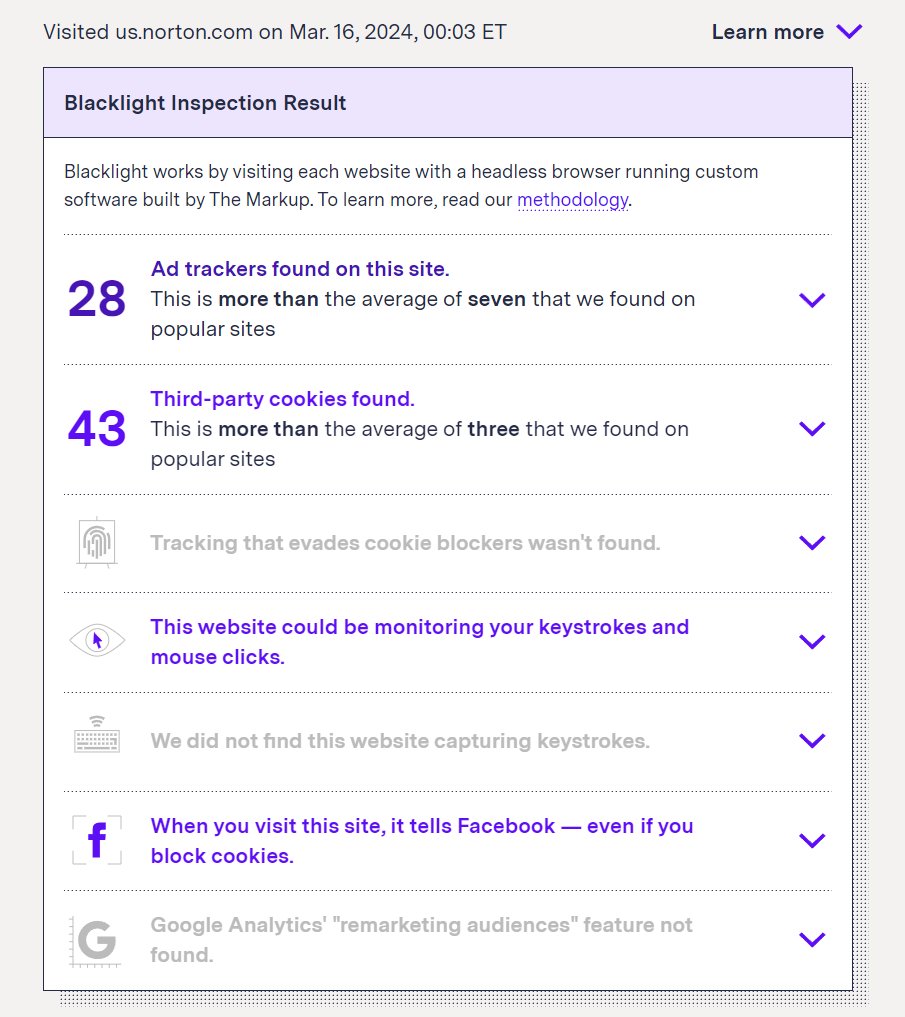
Norton
- Findings: 28 ad trackers, 43 third-party cookies, possible keystroke/mouse monitoring, Facebook pixel.
- Details: An extensive list of ad trackers and third-party cookies from companies including Bounce Exchange, CDNWIDGET.COM and Adobe Inc., ByteDance Ltd., Simplifi Holdings Inc., iSpot.tv, Roku, Inc., Claritas LLC, Alphabet, Inc., Microsoft Corporation, Sargents, Inc., Twitter, Inc., Verizon Media, Impact, Tapad, Inc., CDNWIDGET.COM, Bounce Exchange, and LiveRamp Holdings, Inc.
This compilation presents a clear view of how various VPN providers stand in terms of respecting and protecting user privacy according to the Blacklight test. It emphasizes the importance of choosing a VPN service that aligns with your privacy expectations.
How do these results compare with other websites?
To understand the broader landscape of online tracking and privacy concerns, it's instructive to compare the findings from VPN providers with those of other popular websites. This comparison sheds light on the pervasive nature of tracking technologies across the internet and highlights how data brokers can piece together user profiles. Here's a glimpse into the tracking practices of several widely visited sites:
- CNN.com: Notably high levels of tracking with 42 ad trackers and 63 cookies, along with sophisticated monitoring techniques.
- Foxnews.com: Stands out as particularly invasive, deploying 76 ad trackers and a staggering 126 cookies.🍪🍪🍪🍪🍪🍪🍪🍪🍪🍪
- BBC.com: Exhibits more restrained tracking behavior, with 10 trackers and cookies each, but still engages in user keystroke capturing.
- Ebay.com & Netflix.com: Display moderate tracking with 10 and 5 trackers, respectively, showing a range of cookie use.
- Twitter.com: Among the lower end of the tracking spectrum, with a few trackers and cookies.
- Microsoft.com: Utilizes a broad array of tracking technologies, including 29 trackers and 53 cookies, alongside techniques to evade blockers and monitor keystrokes.
- Play.Google.com & Pinterest.com: Exhibit a few ad trackers and cookies but employ blocker evasion tactics.
- Aliexpress.us & Walmart.com: Present a significant number of trackers and cookies, with aliexpress.us also engaging in keystroke monitoring.
- Reddit.com: Uses only a few trackers and cookies but still employs blocker evasion techniques.
Comparing these results to the VPN industry reveals several insights:
- Widespread Tracking: Popular websites, much like some VPN providers, extensively use tracking technologies, underscoring the ubiquitous nature of online surveillance.
- Increased Use in the VPN Industry: Since our last assessment in 2021, there's an observed uptick in the use of trackers and cookies by VPN providers, a trend that raises concerns about the industry's commitment to privacy.
- The Extremes of Tracking: The contrast between sites like foxnews.com, with an exceedingly high number of cookies, and those with minimal tracking, illustrates the broad spectrum of privacy practices on the web.
- Specific Findings: Unique insights, such as Norton's use of a TikTok cookie, highlight the diverse and sometimes surprising affiliations between VPN/AV providers and third-party trackers.
What Can You Do to Block Trackers and Cookies?
These findings emphasize the critical need for awareness and diligence in protecting online privacy. They also illustrate how data brokers leverage the vast web of interconnected tracking technologies to compile detailed user profiles, making the choice of a privacy-respecting VPN more crucial than ever.
Utilize DNS Blocking
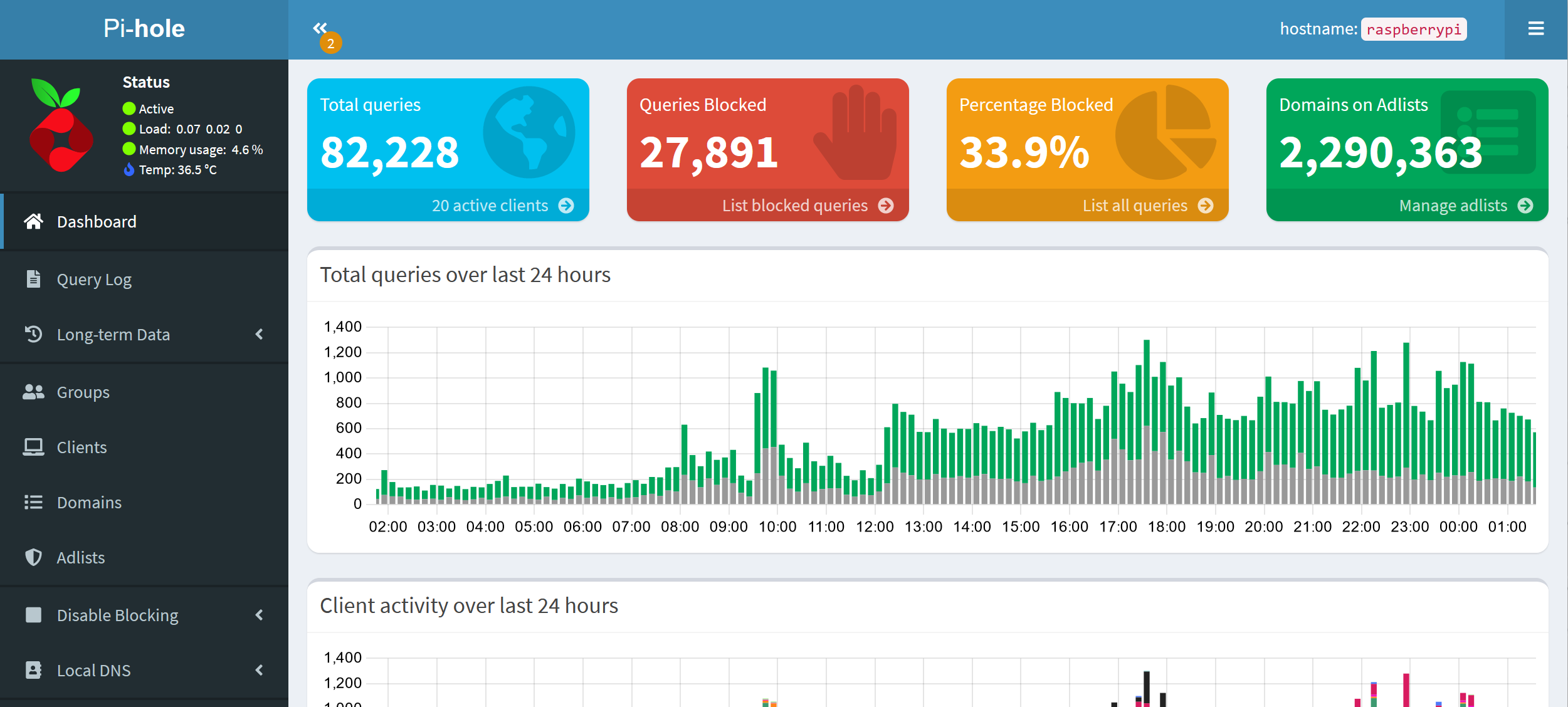
One of the most effective strategies is to block trackers and cookies directly at the DNS level. For users of TorGuard VPN, this can be conveniently achieved by enabling advertisement and tracker blocking in the DNS settings of the app, available on both mobile and desktop platforms. Alternatively, you can use Pihole, an effective DNS blocker that fits on a Raspberry Pi device. This method effectively prevents your device from even communicating with many of the servers that track your online activities.
Add a Browser Extension
Incorporating a second layer of defense enhances your protection. Extensions like uBlock Origin offer comprehensive blocking capabilities that go beyond the basic protections offered by most browsers, targeting ads, trackers, and even malicious websites.
Choose Privacy-Centric Browsers
For an even more secure browsing experience, consider using browsers designed with privacy in mind. The Brave web browser, for instance, blocks cookies and trackers by default and provides additional features aimed at protecting user privacy. Others may prefer to use a hardened Firefox web browser with uBlock Origin.
Understand the Impact
Blocking cookies and trackers is not solely about avoiding targeted advertisements; it's fundamentally about limiting the real-time browsing data that is shared with data brokers. If an ad tracker network captures your device ID and IP address, it can potentially deanonymize you—even if you're using a VPN. This could allow tracking across every site featuring those ads and trackers, which, as observed, includes the vast majority of websites.
By taking these steps, you not only improve your online privacy but also contribute to a culture of digital awareness and protection. It's a commitment to not just safeguarding your own data but also supporting broader efforts to promote privacy.