This step by step tutorial will show how to setup a TorGuard anonymous torrent proxy with popular bittorrent client FrostWire.
FrostWire is free Bittorrent client that was first released in September 2004. While initially it was intended as a fork for Limewire, over time the developers have added more features including Bittorrent support. As of version 5, Frostwire is now a Bittorrent only client and development has continued at a rapid pace ever since the app was first released in 2004.
Frostwire can be downloaded directly from here.
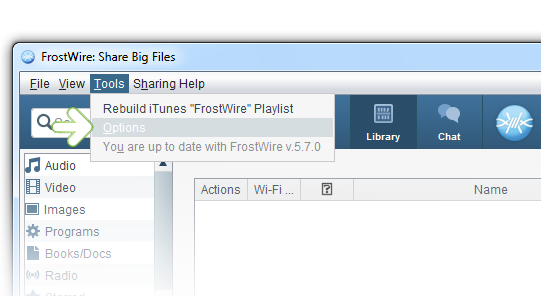
1.) First, start FrostWire and select Tools, then Options.
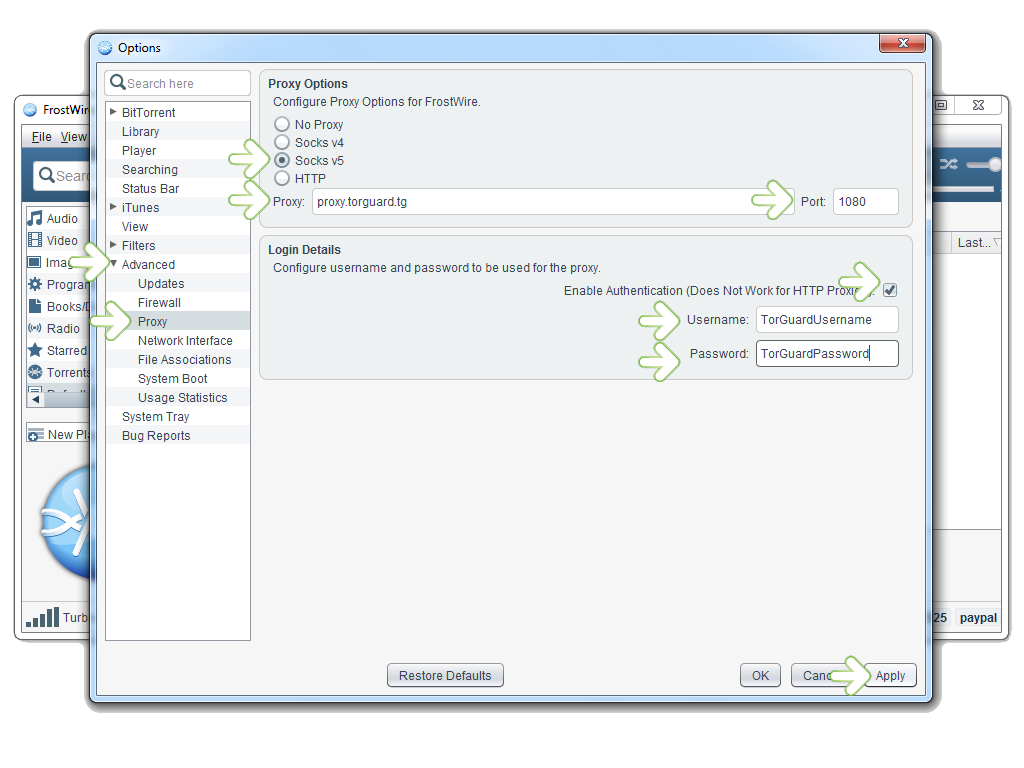
2.) Next, click the Advanced and Proxy tab to bring up the options menu shown below.
Select the Socks v5 option
Proxy: Enter proxy.torguard.tg or the IP of the TorGuard proxy you wish to connect to.
Port: Enter 1080
Click the Enable Authentication checkbox.
Enter your TorGuard proxy username and password.
Click the Apply button.
That is it! You have now successfully configured a TorGuard proxy with FrostWire.
To ensure your torrent client is protected, download TorGuard’s checkmytorrentIP tool to display the torrent client IP address at all times.