By default, the words Bittorrent and “anonymity” don’t go well together. Most people know by now that downloading a torrent in today’s world is a very public affair. Even the quickest download is broadcasting your computer’s IP address to hundreds if not thousands of other peers. It is for this reason that Bittorrent users take great measures to protect their identity and attempt to stay anonymous. This article will cover two easy steps anyone can take before downloading torrents to ensure their personal IP address is not compromised.
Step 1: Torrent Proxy
Bittorrent proxies are one of the easiest and most effective ways to hide your IP address when downloading files. Not to mention fast. Almost every popular torrent client today, like bittorrent, utorrent, Vuze, and Deluge, support the use of proxy servers. Unlike a VPN, the proxy server is always on so you don’t have to worry about leaking your IP during a power outage or accidental VPN disconnect. Another benefit when comparing them to a VPN is a torrent proxy doesn’t use encryption. No encryption means your files will download faster than when using a VPN.
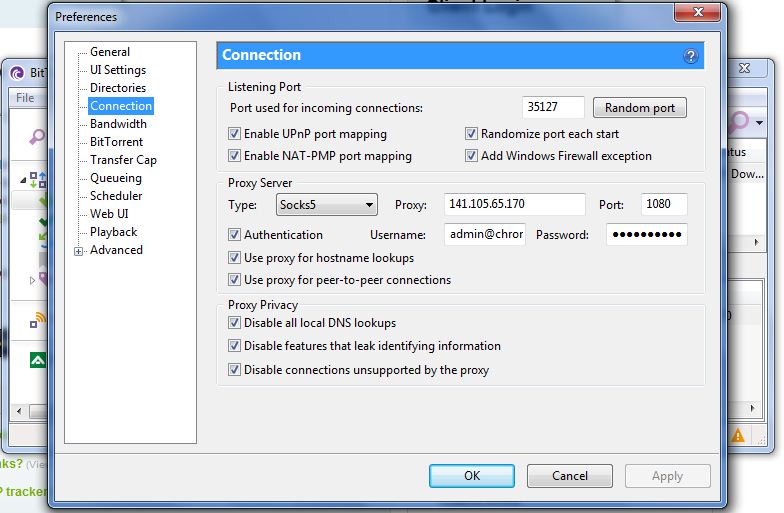
Setting up a bittorrent proxy on Windows, Mac, Linux or even Android is surprisingly simple. Don’t let the graphic below fool you. Most torrent clients have a “settings” or “preferences” section that allows you to enter in custom proxy settings from TorGuard. In the example below, you can see we changed the type to socks5, entered our proxy IP, Port, and user/pass info. Once this info is set, you shouldn’t have to do this again. Click apply, restart your torrent software and you are now downloading all your torrents anonymously through the secure torrent proxy!
Step 2: Anonymous VPN
Using military grade VPN encryption for your internet browsing and torrents, doesn’t have to be difficult. TorGuard VPN provides plenty of free VPN software options to get started, but in this tutorial we’ll highlight the easiest – Torguard lite.
Anonymous VPN service provides the highest security possible when downloading torrents. Torguard lite uses OpenVPN encryption standards to allow a user to activate VPN tunnels on the fly with just the click of a button. No need to mess with internal network settings or certificates, simply download the software and enter your username/password.