

Adding an Anonymous Torrent Proxy to your torrent client is a great way to ensure all your torrent traffic is secure and private. Even if you use a VPN, adding a second layer of security through a proxy is the only way to protect against accidental disconnects from the VPN. Most all torrent clients these days, including utorrent/bittorrent, Vuze, Deluge, support the use of Torrent Proxies.
So, you just entered your proxy settings into your torrent software’s preferences. How can you check if your torrent traffic is really anonymous?
TorGuard provides a FREE, anonymous tool to check your current torrent IP address. This torrent is not logged, tracked, or monitored in any way. It won’t ever download as it is intended to stay active in the que at all times to report your torrent IP address.
To test if your anonymous torrent proxy or VPN service is protecting your torrent client, just visit our Check your Torrent IP page:
http://torguard.net/checkmytorrentipaddress.php
First, download the checkMyTorrentIP Torrent file and open with your favorite Torrent software.

By leaving or “CheckMyTorrentIP” torrent active, you will always know the IP of your torrent client.
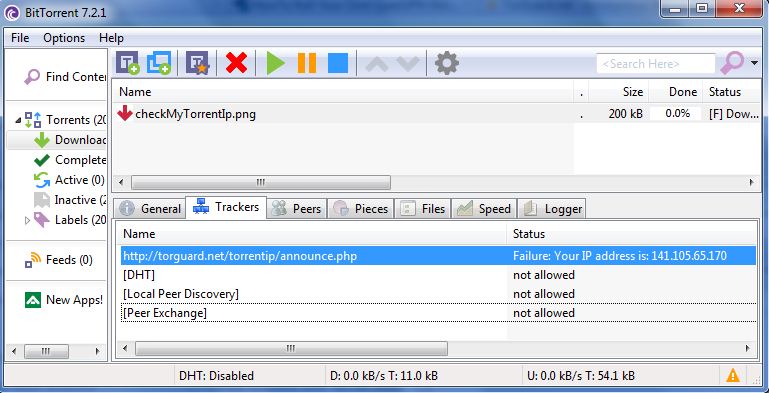
Click the checkMyTorrentIP Torrent and look under the tracker status column. Here you will see a generic message “Failure: Your IP addres is: XX.XXX.XX.XXX”
The IP address displayed here should be an exact match of the IP address you entered in the proxy settings. In our case, the IP is our secure proxy server so all our torrent traffic is being tunneled through the secure Torrent Proxy.