


TorGuard is one of the most secure and powerful VPNs on the market. Not only have we increased our number of servers every year and maintained some of the fastest speeds despite a growing user base, but we’ve also improved the security of our VPN – even when behind the most highly censored networks.
TorGuard uses a broad term “Stealth VPN” to make sure our VPN is never blocked. We have a variety of Stealth VPN features to choose from, and for the new user, it can be a lot to take in. Simply put, from an ISP or network admin’s perspective Stealth VPN makes it appear the user is connecting to a secure SSL enabled website instead of using VPN software.
In this TorGuard Stealth VPN guide, we are going to cover each TorGuard Stealth VPN feature that we have, so you can fine tune and optimize your TorGuard Stealth VPN experience.
OpenConnect Stealth VPN
First up is OpenConnect. This is the default way to connect to TorGuard, and the easiest way to use Stealth VPN since the tunnel type itself is SSL Stealth VPN. What is OpenConnect exactly?
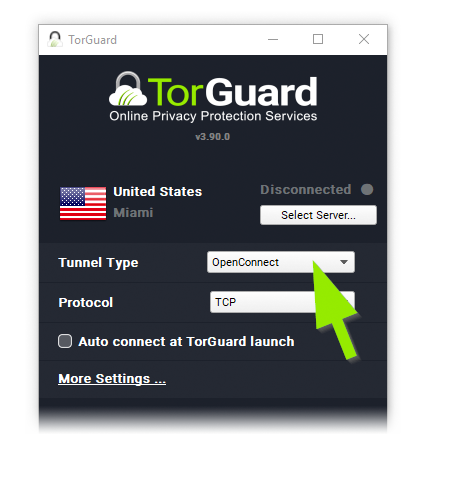
OpenConnect is a SSL VPN technology and an open source port of Cisco’s AnyConnect SSL VPN project. OpenConnect is extremely fast and traffic only appears as normal SSL traffic without any sign of VPN use. This makes OpenConnect an effective Stealth VPN option that is hard to identify.
For most TorGuard VPN users, OpenConnect TCP is the best option and easiest option to use Stealth VPN. However, if you still cannot connect to the internet and there is some problems with OpenConnect, you can try one of our other Stealth VPN options.
TorGuard Stealth VPN Port 4443:
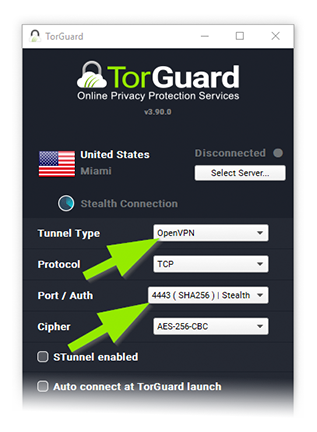
Select OpenVPN under “Tunnel Type” and port 4443 (SHA256) under “Port / Auth”.
Before TorGuard implemented the OpenConnect Tunnel type, we still offered Stealth OpenVPN servers. This is still the most popular method of Stealth VPN and is supported accross all TorGuard’s Desktop and Android apps. You can still access this method of Stealth VPN by using the OpenVPN tunnel type in accordance with the “4443” port, SHA256 Stealth.
The biggest benefit to using this method is that you have a few additional “second layer” encryption options that you can still add to your Stealth VPN tunnel if you are still getting blocked. You can find these below:
Stunnel Feature
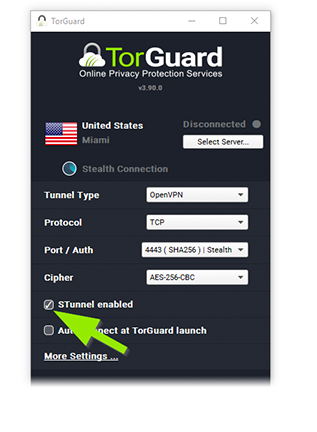
If you’re trying to use TorGuard Stealth OpenVPN but find it won’t connect or work due to strict internet restrictions, Stunnel is a great way to add a second layer of encryption. Stunnel can help you bypass blockage in universities, public Wi-Fi hotspots, libraries, or even in censored countries. Simply select the “OpenVPN” tunnel type and select “Stunnel Enabled” at the bottom.
ShadowSocks Stealth SOCKS5 Proxy Feature
Another popular second layer stealth option is TorGuard’s “Stealth Proxy” feature powered by Shadowsocks. You can find this in the settings area of the TorGuard app. First, go to “More Settings” in the bottom left. From here, go to “Proxy” and then check mark the “Stealth Proxy” button. Here, you can choose which Stealth Shadowsocks proxy server you want.
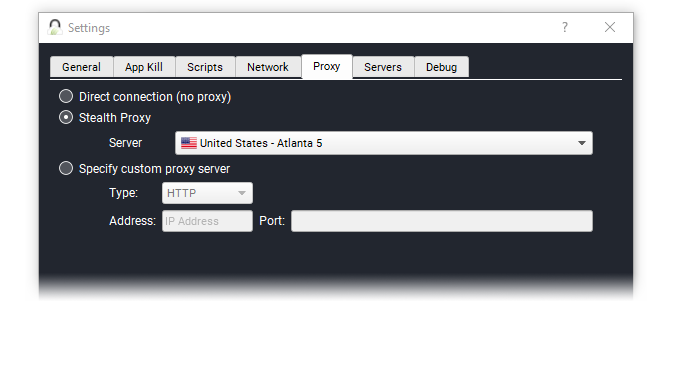
Think of the Stunnel and Shadowsocks features like a double layer of security, and another anonymization factor that hides all indication a VPN server is in use. Since the VPN is connecting through a second encrypted tunnel deep packet inspections can’t sniff out known VPN handshakes.
TorGuard with AnyConnect
Another option you can have if OpenConnect or OpenVPN with Stealth VPN Configurations doesn’t work, or if you can’t install TorGuard VPN, is to use AnyConnect VPN.

AnyConnect is a fast SSL version of VPN that is great for connecting in China–where all VPN apps have been removed. You can still find the AnyConnect app on Google play and iOS, whereas TorGuard’s VPN app has been removed for not complying with the government. Simply download the app, and login with your TorGuard VPN credentials. One could even go as far as naming the AnyConnect VPN profile as, “My boring work VPN” to protect privacy further – just in case someone is looking over your shoulder at the cafe – literally.
When To use OpenConnect vs Stealth VPN vs AnyConnect?
With TorGuard VPN, you have plenty of Stealth options to circumvent firewalls and censored internet restrictions. By choosing the right one for the right job, you will be able to retain your internet freedom wherever you go. Choose OpenConnect for a seamless simple experience, configure Stealth OpenVPN with double layer encryption features, or use AnyConnect if you can’t download the main TorGuard VPN app from the app store or browsers.