|
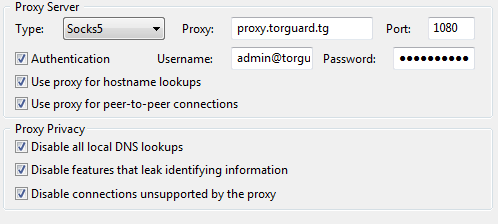
| TorGuard has continued to improve our anonymous torrent proxy service this month by adding a new load balanced proxy server option. This new option will prevent proxy outages and greatly improve speeds by automatically routing your torrent client to the fastest location near you. Should one proxy server become unreachable, you will be automatically transferred to the next fastest server.Taking advantage of this new feature is easy! Simply open your torrent client settings and replace your current proxy IP with: proxy.torguard.tg
Click apply, then make sure to completely restart your torrent software. Clients who still wish to connect to a dedicated proxy IP can continue to do so without any interruption in services. You can find the latest complete list of socks5 proxy IP’s in the torguard.net members are under “My Services”. Still have a question? Visit our knowledgebase for complete instructions on how to update your settings with utorent/bittorrent, Vuze and Deluge. If you are still having trouble setting your software up with this new proxy option, please Contact us for further assistance. |
You might also like