Almost everyone uses online banking to one extent or another. Even if you don’t exclusively bank online, chances are greater than not that you at least use some kind of instant transfer connected service or an automatic bill pay. Businesses primarily use the internet for banking, as they’re constantly performing transactions and moving money in real time. All our money is online – and so is every malicious entity.
Anyone with a substantial amount of money in their bank accounts – primarily businesses – should leave no base uncovered in terms of creating an environment of ultimate security around their money. Sophisticated hacking groups usually don’t waste time trying to intercept the average person’s Apple Pay at a fast food drive through when they can target big corporate accounts that are can be drained with wire transfers, Ach, and Zelle payments.
Hackers are not the only attack vector when protecting online funds from unauthorized access. Many times the attacker is someone on the inside who has intimate knowledge of the business and how it moves money. Online banking theft can easily occur when an old employee retains banking access without management’s knowledge.
One of the easiest and most important security measures, IP whitelisting, virtually eliminates the risk of such an incident occurring. Dedicated IP whitelisting gives the user a second layer of security and provides business administrators with greater control over employee login access. Our findings show that many big banks have failed to implement options that will keep their clients safe.
It Starts with a VPN
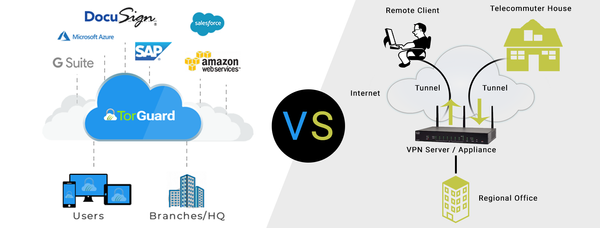
Using a business VPN to protect corporate or personal assets is somewhat commonplace in modern society. Even people who only have a vague understanding of cybersecurity have opted to use VPN services to keep themselves safe online. A VPN makes your browsing traffic and data invisible to anyone who may try to access it without your permission. Many businesses have taken the first step of mandating VPN use on company devices, especially since successful corporate hacking schemes have been relatively commonplace in recent years.
VPNs are necessary now more than ever before as many businesses transition to a work from home environment. They’re an excellent security measure to keep everyone who shares access to important information safe and accountable. If absolutely everything your business (or household) does is in-house, then a VPN is probably sufficient. Chances are, you aren’t your own bank. That’s where other layers of security become necessary.
What is Manual IP Whitelisting?
A great VPN service will offer optional dedicated VPN IP address add-ons, a special IP address in the country of your choosing that can be turned on and off as needed. IP Whitelisting is a security feature whereby only certain IP addresses can access a specific account. Manual IP whitelisting works like a security feature of its own. While it is not entirely impermeable, it definitely does make things difficult for an unauthorized actor to access your accounts from a remote location.
Why Should My Bank Offer Manual IP Whitelisting?
Banks should offer IP whitelisting to everyone, allowing them to choose their dedicated VPN IP address as their whitelisted IP. Doing so adds another layer of security against hackers or even rogue employees. In order to access the banks’ online platform with the username and password, the user must first be logged into the secure VPN account and using the whitelisted VPN IP address. This adds another obstacle that would make it near impossible for a hacker (or disgruntled employee) to remotely access your banking information, even if they had your bank password and company computer.
What IP Security Do Banks Currently Offer?
Most banks offer something called “IP Detection” and session security, which is really not as great as it sounds. With IP detection security, banks will monitor what IP address you normally log in from, and if they see a login attempt from a different IP address, they will authenticate that login with an additional method. This is usually done with a code sent via text message, or an automated robo call that reads an access code. Most of the time, users can then save that login once it’s authenticated so they won’t have to complete the second authentication factor the next time they use that IP address. When the IP changes they will likely be required to repeat the entire process.
Why This is Not Enough
Two factor authentication like IP detection and SMS verification isn’t enough when someone is highly motivated to drain your assets. If you have millions in a corporate account, an ambitious hacker will gladly spend many sleepless nights finding a way to gain access. Two factor authentication is much easier to fool than you may have been lead to believe.
SIM swapping attacks are increasingly common and extremely easy to execute. If a hacker were to simply know the phone number associated with the account and the carrier for the service, a little bit of social engineering and a quick phone call can have your service (and SIM card) switched to a phone in their possession. If the hacker has someone on the inside at a cell phone retail store it can be done with a few keystrokes. This means two factor authentication codes will be sent directly to the bad actor’s phone while you are asleep, and you likely won’t know a thing about it until it’s too late. These nightmare scenarios have played out time and time again.
Mobile phone carriers are constantly being sued and have faced legal repercussions for how easily they help to facilitate SIM swapping attacks. It’s not a good idea to assume that the issue will work itself out anytime soon – so long as SIMs can be swapped, someone who is highly motivated to steal a large amount of money will find a way to successfully do it.
We Checked 5 Big Banks, and Here’s What We Found
In order to determine which banks provide the most advanced IP safety settings for their users, we checked the top 5 online business banks in the US. Our findings were disappointing.
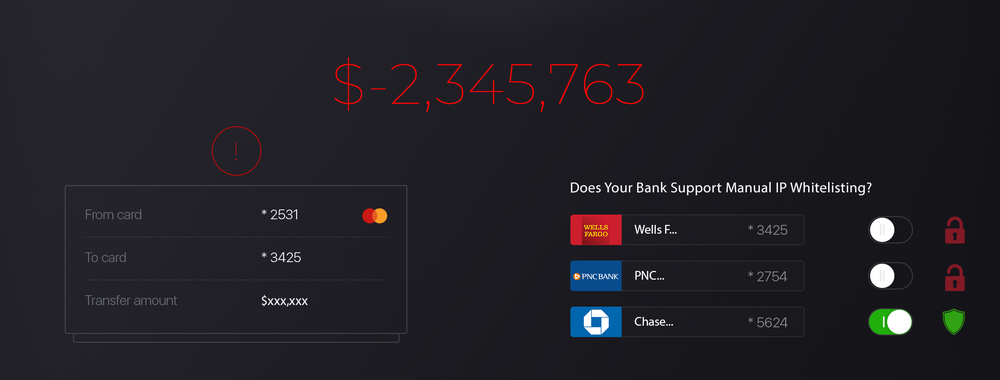
- Chase Business – Offers IP Security Settings (Including Manual per User Whitelisting) in the Account Security Manager.
- Wells Fargo – Does Not Offer Manual IP Whitelisting, Only 2 Factor Authentication
- PNC Bank – Does Not Offer Manual IP Whitelisting, Only 2 Factor Authentication
- Capital One – Does Not Offer Manual IP Whitelisting, Only 2 Factor Authentication
- citigroup – Does Not Offer Manual IP Whitelisting, Only 2 Factor Authentication
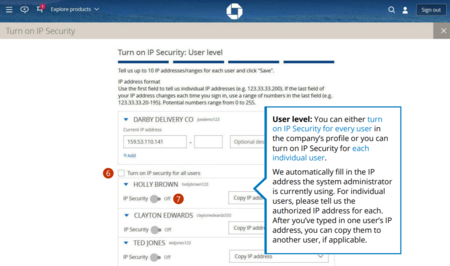
Out of every major bank we checked, Chase Business is the only bank to offer a reliable security method that prevents its business users from being subject to potentially devastating SIM swap attacks. Businesses banking with Wells Fargo, PNC Bank, Capital One, and citigroup are not offered this feature online at the time this writing.
In our search for alternative business and personal banks that prioritize user security, we’ve discovered that valliance.BANK, a small business and personal bank with a limited number of branches in Texas and Oklahoma, offer IP whitelisting as a security feature. If a very small bank can afford to offer this level of security to its users, it’s safe to say that implementing manual IP whitelisting features certainly wouldn’t be cost prohibited for goliath banking institutions who can essentially afford to purchase the world.
At the time of publication, we’re upset to find that we don’t have more news to report. If we’re able to obtain more information about reliable online banking institutions for business users, we will happily update our list.
Improve Your Safety and Demand More
The very first thing everyone should do, whether they be an individual or a business, is utilize a VPN like TorGuard. We offer both shared and dedicated VPN IP addresses that are perfect for securing access to online banking without jeopardizing your safety. Hopefully, you’ll be using our dedicated VPN IP services in conjunction with manual IP whitelisting features.
If your bank does not offer manual IP whitelisting, you need to contact them. If enough people understand the security risks posed by the absence of this feature and confront their bank requesting the feature, banks may feel forced to implement the changes necessary to protect their clients.