Downloading files via BitTorrent is possibly one of the easiest and most efficient ways to share content with other users around the world. Downloading torrents however is far from anonymous and can be detrimental to one’s personal privacy if special steps aren’t taken. Even if one quickly downloads a single file, that is all it takes for your personal IP address to be seen by thousands of other peers all around the world. The bad news is that some of these peers aren’t interested in downloading content, they are only interested in recording your private download habits and connecting them to a person’s personal IP address. Would you be comfortable broadcasting each and every file you download over bittorrent to the rest of the world and personally linking that download to your name? Most people would answer with a resounding “NO” to this question. Unfortunately, what happens on Bittorrent, doesn’t stay on bittorrent – unless you take steps to become anonymous. You don’t have to be a genius to anonymize your torrent downloads, and in fact it takes just a few minutes of your time. In this article we will show you exactly how easy it can be in three easy steps.
Step 1.) Get a TorGuard Torrent Proxy
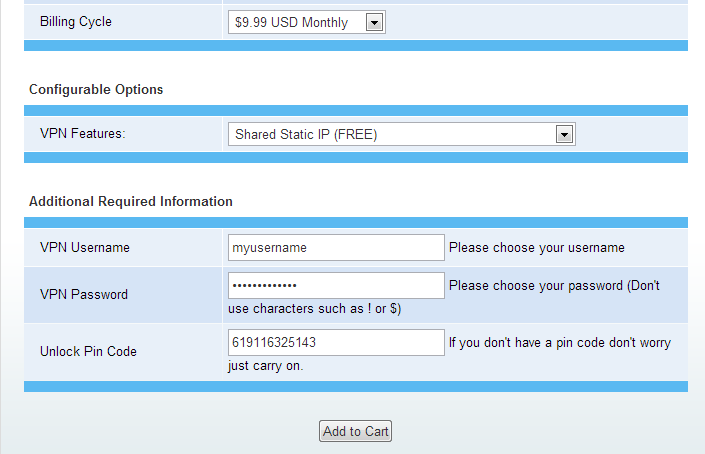
TorGuard is one of the top ranked anonymous bittorrent services and is highly effective in protecting your online identity. Signup just takes a couple minutes and can be purchased for as low as $5 per month with credit card, paypal, bitcoins or OKPAY. One can choose two types of services to anonymize bittorrent downloads with TorGuard; a Torrent Proxy or VPN service. For this tutorial we will cover the easier option, the Torrent Proxy. First navigate to TorGuard.net and purchase one of the Torrent Proxy plans. During checkout you will be asked to provide a VPN/Proxy username and password – make sure to write this down since we will need this info in step 2. Once payment is complete, your account will be instantly activated and ready to use.
Step 2.) Activate TorGuard Anonymous Bittorrent
Now that your the proud new owner of a torrent proxy, it is time to activate your proxy on a supported torrent client. It is important to note that one must use a torrent client that fully supports anonymous socks proxy downloads. Supported clients include utorrent, bittorrent, Deluge and Vuze. To get started, first download the “Torrent Proxy Setup” software from the TorGuard downloads page here. Make sure to choose the appropriate download for Windows, Mac or Linux systems. Before running the software, first be sure to close and torrent clients completely or the settings may not properly take effect. Next, run the installer and then locate and click the”TorGuard Proxy” icon on your start menu or desktop. Remember the Username and Password you entered from Step 1? Enter this info into the window as seen below:
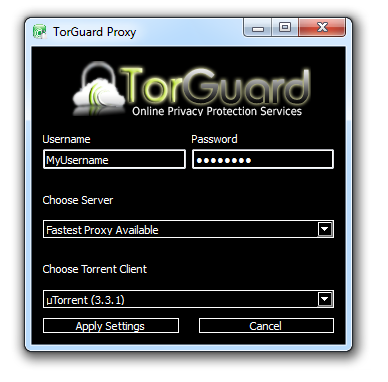
Be sure to enter your Username and Password exactly as you entered it during the TorGuard singup. For server, it is best to select “Fastest Proxy Available” as this will automatically connect you to the fastest torrent proxy closest to your current location. Next, choose your torrent client software and select either utorrent, bittorrent, Deluge or Vuze. Finally, click “Apply Settings” to activate your anonymous torrent proxy. That is it! Your torrent client now has the optimal security settings added.
Step 3.) Check your Torrent IP Address
The last step is to double check your Torrent IP address just to ensure that all your torrent traffic is successfully being routed through the anonymous proxy. To do this, simply download the CheckMyIPTorrent from here and load it into your torrent client software. This torrent won’t actually download as it is intended to stay active in your que and always report back your current torrent client IP address. To check your IP, simple click the tracker status tab – the IP listed should now be TorGuard’s anonymous proxy server instead of your personal IP address. Congratulations, you are now downloading torrents anonymously.