

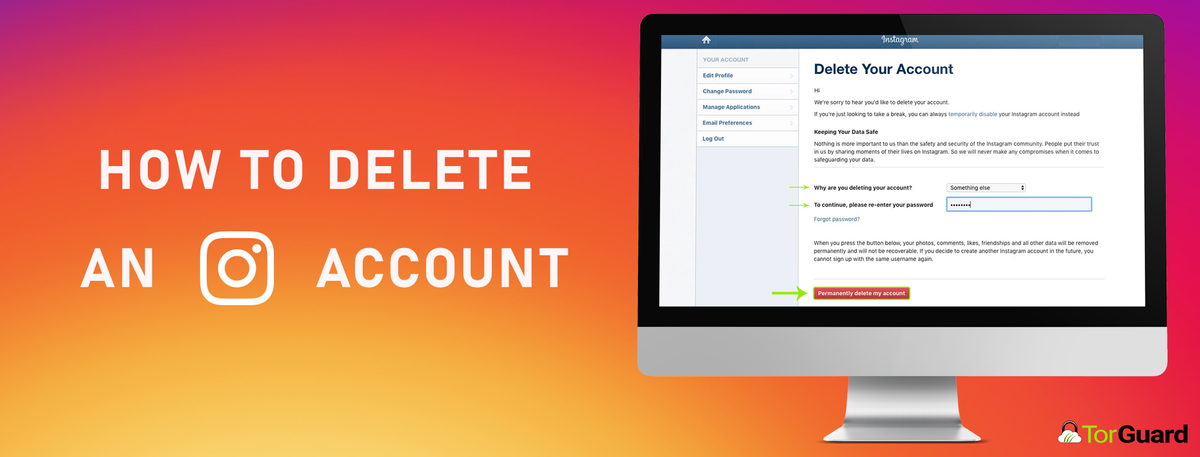
Is it time for a social media detox? Are you more concerned about your privacy than you were before? Have you decided to stop living on the Instagram app and start living in the real world? Then it’s time to permanently delete your Instagram account. In order to make sure no remnants of your information are left on Instagram’s servers (or available to hackers), you’ll need to follow the steps to completely delete your IG account.
What Does Instagram Know About Me?
Instagram collects your pictures, videos, data that connects people to those videos and pictures, and geolocational data about where you took them. It also tracks your device, stores facial recognition information, keeps a record of your transactions made via Facebook, stores your messages, your texts, and your contacts. Instagram is very invasive – it embeds itself in your privacy. The data storing alone should be enough to make you want to know how to delete your IG account.
How to Back Up Instagram Pictures and Videos
You may not want Instagram to have a record of everything you’ve done, but you might want that record for yourself. Before you decide to delete or disable your IG account, download a backup of your posts. You can do this by going to your profile on the Instagram app, tapping the three lines, and tapping settings.
From settings, tap “security”, and then tap “download data”. Verify your email address and then tap the blue button that says “request download”. Instagram will email you a file of all your stuff at their earliest convenience – it could be minutes, hours, or days before you receive it. Once you receive the email, you need to download the contents within 24 hours.
How to Delete Your Instagram (IG) Account
You have two choices – you can delete or deactivate your IG account. Deleting is permanent, and deactivating means that you plan to come back at some point.
How Do I Deactivate my Instagram Account?
Instagram won’t allow you to temporarily deactivate your IG account from the Instagram app. You’ll need to visit Instagram in a web browser to do that. To Deactivate, go to your profile page. From profile, go to “Edit Profile”. Under Edit Profile, select “Temporarily disable my account”. Instagram will ask why, and you have to answer them. Then, enter your password and select “Temporarily Disable My Account” again. Your profile will be waiting for you when you come back.
How Do I Permanently Delete My Instagram Account?
To permanently delete your IG account, you’ll need to enter your username and password from a web browser. Visit Instagram’s Delete Your Account page. You can’t delete your account from the Instagram app. They’ll ask you why you’re deleting your account, and you have to select an answer to proceed. Then, enter your password again. Then, click “permanently delete my account.”
What Happens Now?
Instagram’s privacy policy is a little murky about how long they have to fully remove your data, but it will, in fact, be fully deleted. You cannot sign up with the same username and deleted accounts cannot be recovered. If you’re not sure you want to make such a bold move, deactivate first.