


TorGuard VPN’s app has become more and more powerful as the years have gone by. We’ve put good effort into developing the app to be robust, while still easy to use. It has plenty of features for power users, but the accessibility of the app is still present.
Sure, you can just load up the TorGuard application, pick your server, and connect faster than ever with the OpenConnect and OpenVPN tunnel type, but if you’re looking to utilize VPN Kill Switches with the TorGuard application, you’ve come to the right place.
TorGuard App Kill Switch:
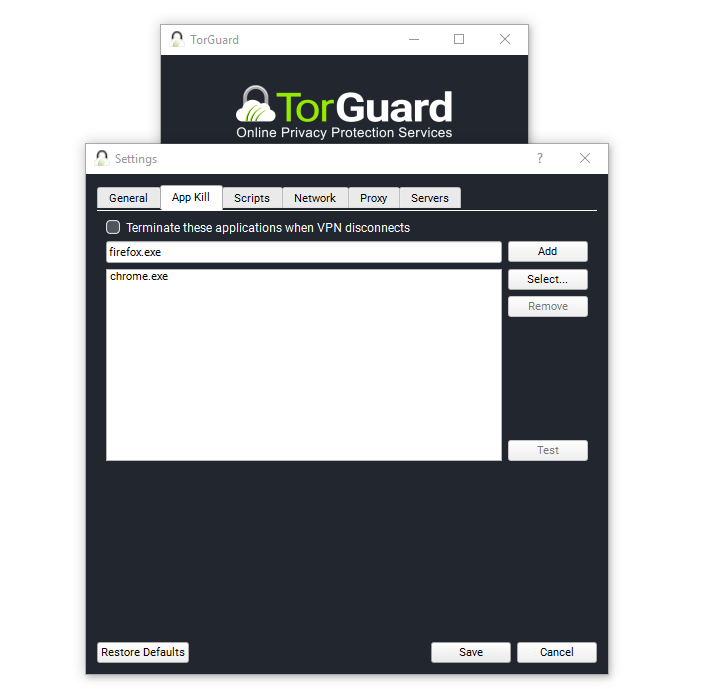 The TorGuard App Kill Switch allows one to auto terminate any process you specify (like chrome.exe). You can choose from a list of running processes, or add a custom entry.
The first step is finding the “More Settings” option. You can find this directly underneath the “Auto Connect at TorGuard Launch” toggle box.
Once you click on “More Settings” navigate to the “App Kill” section. Here you can choose which apps to “kill” when TorGuard connects. This could be due to TorGuard closing down because of some other app, if your computer has some sort of error, or if the power goes out and resets your internet.
While TorGuard VPN is consistent and stable and many TG users report staying connected for months at a time, this feature ensures that any app connected to the kill switch stays connected while your VPN is active. If it’s not, it shuts down. This can be useful for any app that you want to stay tied to your secure VPN connection.
TorGuard Network Kill Switch Features: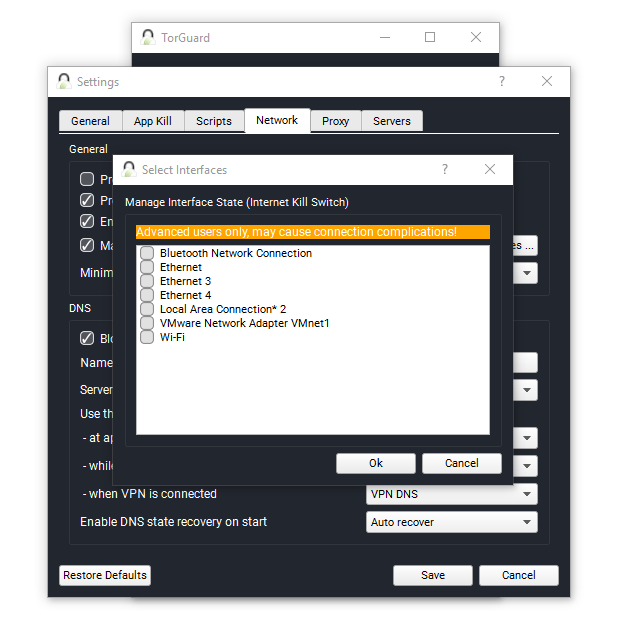
TorGuard’s second kill switch feature is the “Network Kill Switch”. You can find this feature in the “Network” tab. Once you click on the tab, navigate down to the checkmark box “Manage Interface State (Internet Kill Switch)”. From here, you can check the box then click “select interfaces”. This is where you pick your internet setting.
Once you pick your Ethernet or Wi-Fi adapter, you can click save. This means that when you close down TorGuard, your internet will also close down and stop working. This is a good way to ensure that your computer’s internet is always encrypted and secured with TorGuard VPN, even when you step away from the keyboard.
It is important to note that no kill switch should ever be regarded as a “100% guarantee”, and for highest levels of security one should utilize multiple layers. This can easily be accomplished by routing applications that have proxy support through socks5, ssl, and http proxies, all of which TorGuard provides.
Add a Second (or Third) Layer of Security: VPN Router
Another good way of always securing your internet is purchasing and using a VPN router throughout your house on all of your devices. This way you can connect to your VPN router on your device and everything is encrypted. Then, if you have another device or use case, you can switch to your normal router’s connection. It’s even possible to connect to the proxy or VPN through the VPN router, essentially adding a second layer of security to your session.