This recent year has brought about a large rise in the use of Anonymous VPN and Proxy servers. As more and more people choose to hide their IP address and stay anonymous on bittorrent many people ask us: What is the main difference between a Torrent Proxy and VPN service? Which is better? The answer really depends on the individual needs of each user. This article will go over some of the benefits of each and
Torrent Proxy vs VPN Service
Usage: Unlike a VPN which tunnels all your traffic through the secure server, a torrent proxy simply tunnels one application at a time. This allows you to secure ONE app like utorrent, bittorrent, Vuze, or Opera, while leaving the rest of your connection running through your local IP or VPN. For example, in this way you could connect a bittorrent client to a TorGuard proxy server in Canada while streaming your favorite TV programs through your local IP or secure VPN connection.
Speed: While a VPN features military grade encryption, a torrent proxy runs traffic uncapped through the proxy allowing for MAX download speeds. VPN encryption does tend to slow a connection, so if it is not 100% needed it will keep downloads running a bit faster. Routing your bittorrent downloads through an Anonymous torrent proxy will provide one of the fastest download experiences for torrent users.
Double Layer Security: Two layers are always better than one. It is a well known fact that VPN “kill switches” simply don’t work. While they may be a temporary solution to a VPN disconnect, NO kill switch can guarantee that your IP won’t leak. All it takes is a fraction of a second to be exposed and compromise your personal privacy. Many VPN users select to use a Torrent Proxy as a “second layer” of security to prevent against accidental VPN disconnects, power outages, or even computer failure. Using a proxy is the only way to guarantee that your IP won’t be exposed for any reason. Since a proxy is always on, your downloads will remain tunneled through the proxy regardless of if you are running a local or secure VPN connection. Did the computer fall asleep again while you were out? No worries, the anonymous bittorrent proxy is always on protecting you 24/7.
Setup: TorGuard makes setting up a VPN extremely easy – there is no doubt about it. While setting up a torrent proxy isn’t hard, it does take a couple clicks to get the right information in your proxy settings. Once setup however, no other action needs to be taken as the proxy will always be on. Most all major torrent clients like utorrent, bittorrent, Vuze, Deluge and more fully support socks5 proxies.
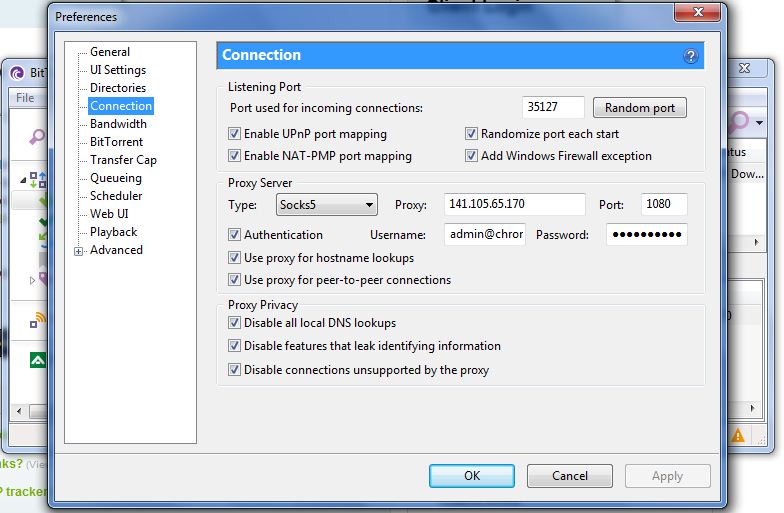
For example, in utorrent/bittorrent just click preferences then Connections. Here you will see the area to input your Proxy server IP address, Port (default 1080 with TorGuard), Username/Password, and security settings. Click apply and that’s it! The proxy is now on.
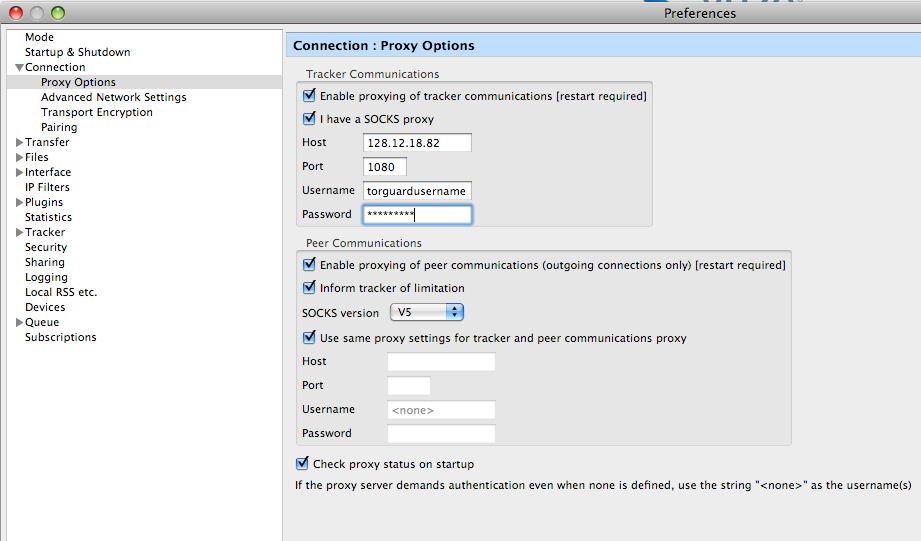
Setting up an Anonymous Bittorrent proxy in Vuze is just as simple. Open up the preference screen, select Connection, then click proxy options. Here you will see a spot to enter the Host (Proxy IP), Port (1080), and TorGuard username/password. Vuze is the most popular choice among TorGuard clients as it offers some of the best IP security features for downloaders.
Don’t go another day without protecting your torrent downloads. Protect your personal privacy on Bittorrent with Anonymous Torrent Proxies from TorGuard!