


Shopping for a VPN WiFi router these days can feel like sifting through a jungle of dubious online reviews and outdated product recommendations. If you've ever Googled "Best VPN Router," you've likely been bombarded by an endless stream of low-quality affiliate blogs pushing everything from out-of-date models to generic white-labeled hardware that might as well double as doorstops. Finding a quality VPN router that excels both as a router and in managing VPN encryption is a bit like shopping for a flying car. Sure, they exist, but they're neither stellar cars nor top-notch aircraft.
Now, if you're a tech whiz, you might opt for customizing routers with OpenWRT or DDWRT. But what about those looking to click on Amazon, get next-day delivery, and unpack a box that contains a formidable VPN router ready to go right out of the box? Here at TorGuard, we know a thing or two about VPN routers, and in this blog article, we're not about to hawk some sub-par, potentially backdoored gadget masquerading as the next big thing in internet security. No, we're here to guide you to the best VPN routers for OpenVPN and Wireguard available on Amazon right now—and no, we won’t sprinkle any affiliate links in our recommendations.
So, without further ado, let's dive into the wireless radio frequency sea we've all come to know and love—but this time, with a secure VPN twist.
Why Run a VPN WiFi Router?
Encrypting your entire WiFi network through a VPN tunnel offers significant benefits—and contrary to what some skeptics might suggest, these benefits extend far beyond just streaming anime from geo-restricted regions. Real-world security enhancements are at the heart of why a VPN router is a wise investment for any internet-savvy household.
One of the paramount benefits of a VPN router, beyond encrypting your internet connection, is the inclusion of a NAT firewall. VPNs like TorGuard come equipped with a NAT firewall enabled by default, serving as a robust second layer of defense against external threats. As our homes become smarter with devices like smart TVs, home automation systems, and an array of IoT devices, the average user's attack surface expands significantly. While regular updates are the best line of defense for these devices, a VPN NAT firewall provides critical backup protection. For example, consider the recent vulnerability found in thousands of LG Smart TVs, susceptible to remote exploitation through ports 3000 and 3001. If you're using TorGuard on a VPN router that also provides WiFi to such a vulnerable Smart TV, the VPN shields your TV by routing its internet traffic through a secure server equipped with a NAT firewall. This setup effectively conceals your TV’s ports from the public internet, shielding them from unauthorized access.
Moreover, running a VPN tunnel on a WiFi router can safeguard your network even from vulnerabilities in the router itself, as all of your traffic is funneled through an encrypted tunnel behind this secure NAT firewall, isolating it from local network threats.
It’s not necessary to run everything through the VPN router. In fact, many choose to add a VPN router to their network on a separate IP range. This setup allows them to connect IoT devices, guests, or other potentially vulnerable traffic through the secure VPN tunnel, while maintaining a separate, regular WiFi network for other uses. This dual-network approach optimizes both security and functionality, providing peace of mind and enhanced control over your digital environment.
What's the Best Consumer Grade VPN Router?
It's puzzling why more WiFi router manufacturers don't listen to consumers and integrate VPN client support into their platforms. Perhaps they're wary of the potential increase in customer service calls, but one company boldly stands apart by embracing innovation: ASUS.
While ASUS routers have had their share of security challenges, including remote code injection vulnerabilities that have since been resolved through firmware updates (we recommend using a VPN tunnel on an ASUS router for added security), there's a lot to admire once you get past the relentless gaming advertisements. Beneath all the flashy marketing lies a well-designed router interface that offers exceptional VPN client support on high-end devices. These routers not only process VPN encryption efficiently but also provide extensive WiFi coverage that can blanket your space in glorious connectivity.
ASUS has long supported OpenVPN client functionality, but a recent standout feature is "VPN Fusion." This new VPN client functionality is currently available only on a select few models, but the great news is that it supports Wireguard, which performs exceptionally well on ASUS hardware. For those who prefer the steadfast reliability of OpenVPN TCP over blazing speeds, you'll be pleased to know that nearly all ASUS routers support OpenVPN client mode.
Here is the full list of ASUS WiFi routers that, at the time of this writing, support "VPN Fusion":
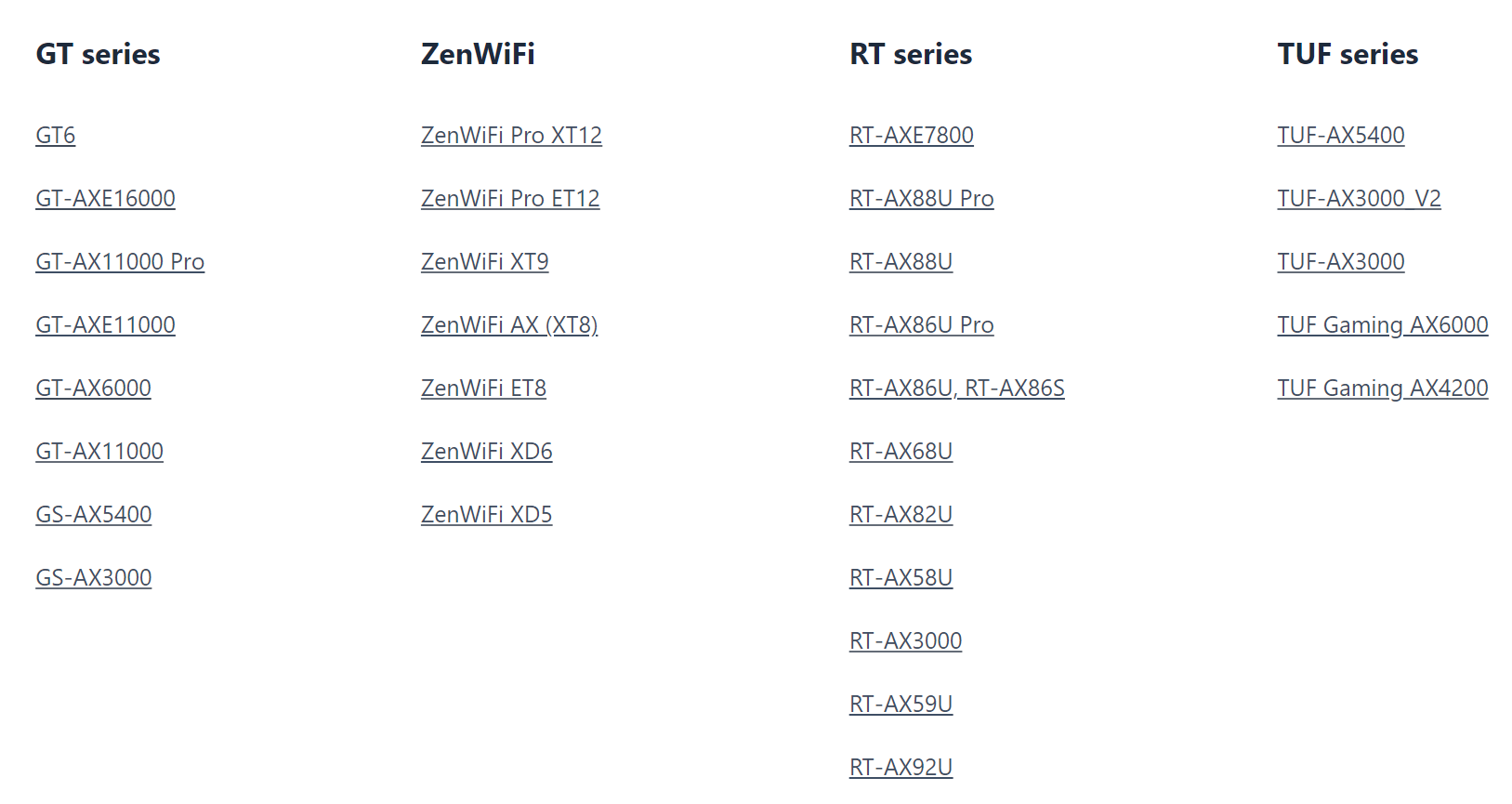
How to Enable TorGuard Using ASUS VPN Fusion
Adding your TorGuard OpenVPN or Wireguard tunnel to an ASUS router equipped with VPN Fusion is surprisingly easy, thanks to ASUS's intuitive new user interface.
Step 1: Obtain the Configuration File
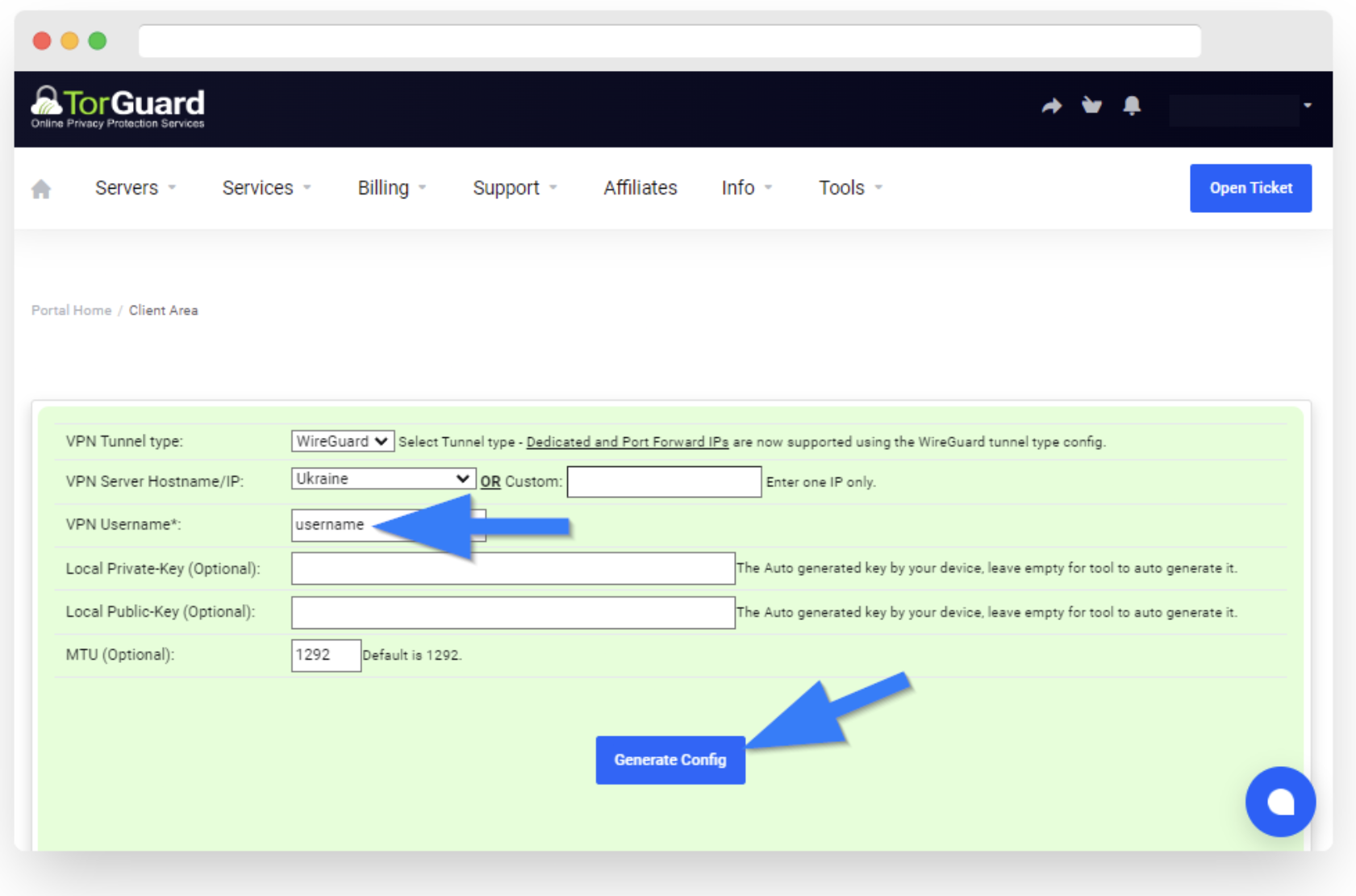
- First, head over to the TorGuard VPN member's area and navigate to the VPN config generator. Here, you can generate a custom OpenVPN or Wireguard config file for any server location, Dedicated VPN IP, or Residential VPN IP.
- Select your desired location, click "Generate," and then download the OpenVPN or Wireguard client configuration file.
Step 2: Access the ASUS Router Admin Panel
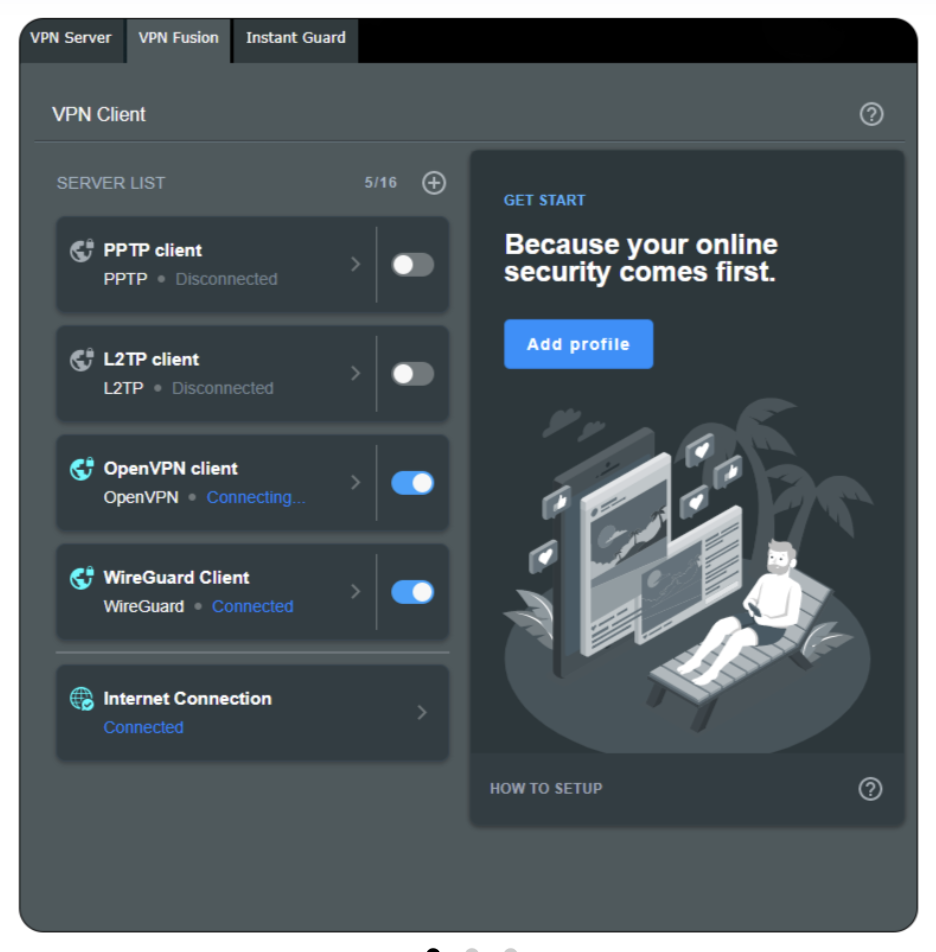
- Log into your ASUS router's admin panel.
- Click on the "VPN" tab on the left menu. ASUS routers support both VPN server and client functions. For using it with TorGuard, click the "VPN Fusion" tab for client mode.
Step 3: Set Up the VPN Connection
- Name the connection "TorGuard" or another name that will help you identify it easily.
- Under "VPN Type," choose either Wireguard or OpenVPN, depending on which config you generated earlier.
- Click the "Upload config" button and select the OpenVPN or Wireguard config file that you generated in the first step.
Step 4: Activate the VPN
- Click the "Apply all settings" button.
- Finally, toggle the switch to ON under the server list to activate the VPN connection.
Once these steps are completed, your entire internet connection will be tunneled through the VPN, securing your online activities with TorGuard's robust encryption. This setup ensures that all devices connected to your ASUS router benefit from enhanced privacy and security.
A Little VPN Goes a Long Way
Consumer VPNs boast a long list of benefits, and while many people are familiar with the popularly advertised uses such as geo-unblocking, the real-world security and privacy advantages of running a VPN tunnel on your WiFi router are often overlooked. As security vulnerabilities increase, having a VPN can ensure that every device connected to your network is shielded by a second layer of protection. This added security can be a lifesaver, especially when that "smart" TV turns out to be not so smart after all.
Deploying a VPN on your WiFi router doesn't just protect your browsing activities; it extends robust encryption across your entire digital footprint at home. This means that whether you're streaming, browsing, or just keeping your smart home devices online, they're all protected under the same secure umbrella. In today’s increasingly connected world, a little VPN protection goes a long way towards maintaining your digital privacy and security, safeguarding your home network against intruders, and ensuring your personal data remains just that—personal.