
We are thrilled to announce a significant expansion to our TorGuard OpenWRT VPN apps lineup! Today, TorGuard is introducing three new VPN apps for our PrivateRouter OS – now fully compatible with mainline OpenWRT builds. The new OpenVPN, SSTP, and AnyConnect VPN apps not only offer an effortless, intuitive user experience, similar to our desktop and mobile apps, but they also provide an enhanced level of security right from the access point. Following the addition of an easy-to-use WireGuard VPN app, we have expanded our offering to include the robust OpenVPN, SSTP, and the highly versatile AnyConnect protocols. With a few clicks, you can now secure your internet connection by simply choosing your preferred servers, ports, and authentication options, entering your VPN credentials, and connecting to your chosen TorGuard VPN server. These additions are part of our ongoing commitment to user security, offering reliable, versatile, and user-friendly services to meet the growing needs of our user base.
Why should I run TorGuard VPN from my WiFi Router?
Running a VPN directly from your router has numerous advantages that can significantly enhance your online security, privacy, and overall internet experience. Let's delve into the unique benefits that these newly added TorGuard OpenWRT VPN apps bring to your PrivateRouter or any OpenWRT compatible device.
Protect Multiple Devices at Once
A primary advantage of running a VPN from your router is the capacity to secure multiple devices concurrently. Your VPN-secured router becomes a fortress that extends its protection to every device connected to it. This means that your laptop, smart TV, gaming console, mobile device, and even the army of IoT devices in your home, all can benefit from the secure, encrypted connection offered by the VPN.
Importantly, this layer of security stands strong even if your standard ISP-issued access point is compromised. In an age where more devices are internet-capable than ever before, the risk of at least one of them turning rogue or getting compromised has risen. A rogue device can wreak havoc on a network, compromising other devices, stealing data, or even bringing down the network entirely. However, with a VPN running on your router, you've established a secure, encrypted tunnel that insulates your internet traffic from these threats.
Whether it's a direct attack on your router, a compromised IoT device, or a sophisticated Man-in-the-Middle (MiTM) attack, your data remains securely encrypted and out of reach from cybercriminals. Even if they could intercept the data, the strong encryption applied by the VPN ensures it is unreadable and useless to them. In essence, your VPN acts as a protective shield, providing an added layer of security that secures your internet traffic, regardless of what device it originates from or what it's traversing through.
By incorporating our new TorGuard OpenWRT VPN apps into your PrivateRouter device or any OpenWRT compatible device, you significantly enhance the security of your online activities. It's an effortless yet powerful way to ensure every digital step you take is secure and private.
Superior VPN Protocol Compatibility
One of the key advantages of using TorGuard's new OpenWRT VPN apps is their superior compatibility, especially when dealing with restrictive networks or countries where certain VPN protocols might be blocked. WireGuard, for instance, while being highly efficient and fast, may be blocked in some countries or networks. This is where TorGuard truly stands out.
Our VPN applications offer a variety of "stealth" VPN router encryption options. This includes support for SSTP and AnyConnect (OpenConnect), in addition to V2rayA connection options. These protocols are specifically designed to circumnavigate blocks and restrictions, allowing your VPN traffic to pass through undetected.
This robust array of options allows you to bypass stringent censorship and firewalls, notably the 'Great Firewall' of China. By encrypting your internet traffic in a way that looks like regular SSL traffic, these stealth protocols enable you to maintain your internet freedom, irrespective of your location or network conditions.
Whether you're a journalist trying to report the truth in an area with heavy internet censorship, a traveller wanting to access geo-restricted content, or a resident in a country with strict internet controls, our stealth protocols give you the ability to punch holes through these digital barriers, offering you unhindered access to the open, uncensored internet.
With our superior compatibility, TorGuard ensures that no matter where you are or what network you're using, your online freedom and privacy remain uncompromised.
Extreme Convenience
We understand that convenience is key when it comes to maintaining your digital privacy. This is why we've made using our new OpenWRT VPN apps extremely convenient for our users.
Once you've set up a VPN connection on your router using our app, every device that connects to your Wi-Fi network will be automatically protected by the VPN. Unlike other setups where you need to individually install and run a VPN client on each device, with a VPN router, the encryption starts right at the access point. This eliminates the need for VPN software on each of your devices. This is not just convenient, it also ensures that your devices won't accidentally bypass the VPN connection, maintaining your security and privacy at all times.
Of course, if you prefer to have a client-side VPN connection for specific devices to create a double tunnel, you can still do so. The flexibility we offer ensures that you have full control over how and when your data is protected.
Another significant advantage of setting up a VPN at the router level is that it effectively prevents DNS leaks. These leaks can expose your online activities and location, thereby compromising your privacy. But with our VPN router apps, you can rest assured that your DNS requests are securely routed through the VPN tunnel, ensuring your online activity remains private and secure, no matter how many devices you have connected to your network.
Superior Compatibility and Automation
TorGuard’s new OpenWRT VPN apps offer unparalleled compatibility across a wide range of devices and networks. Whether you're using smart home devices, gaming consoles, or other Internet of Things (IoT) gadgets, our VPN router apps are designed to work seamlessly with them all. Even devices that typically don’t support native VPN applications can enjoy the benefits of a secure connection.
But it's not just about compatibility - TorGuard’s VPN router apps are designed to offer a completely automated experience. Once set up, your VPN connection will automatically protect all your devices whenever they connect to the network. No need to manually connect each device every time you want to use the VPN - it's all handled automatically by the router. This provides an extremely user-friendly experience, allowing you to enjoy the benefits of a VPN-protected connection without the hassle of manual configuration for each device.
Unblock Applications and Content
Of course, we're fully aware that not everyone out there is seeking military-grade encryption for their home networks (although we think it's a pretty cool perk!). So, you might be asking yourself, what can these VPN WiFi router encryption apps do for an average Joe or Jane like me? Well, we're glad you asked!
In addition to turning your router into an impenetrable fortress of privacy, TorGuard's new OpenWRT VPN apps also unlock a whole new world of streaming possibilities. Been dying to binge-watch that latest series while on vacation that's only available back home? Or maybe there's an exclusive sports event that's geo-restricted when traveling? Well, with our VPN apps, geographical barriers are a thing of the past!
Remember though, with great power comes great responsibility. So when you find yourself nestled comfortably on your couch, embarking on a 10-hour streaming marathon of your favorite show, don't forget to get up and stretch once in a while. We've got your online privacy and entertainment needs covered, but warding off the effects of a sedentary lifestyle? That's on you. Happy streaming!
TorGuard's AnyConnect PrivateRouter app
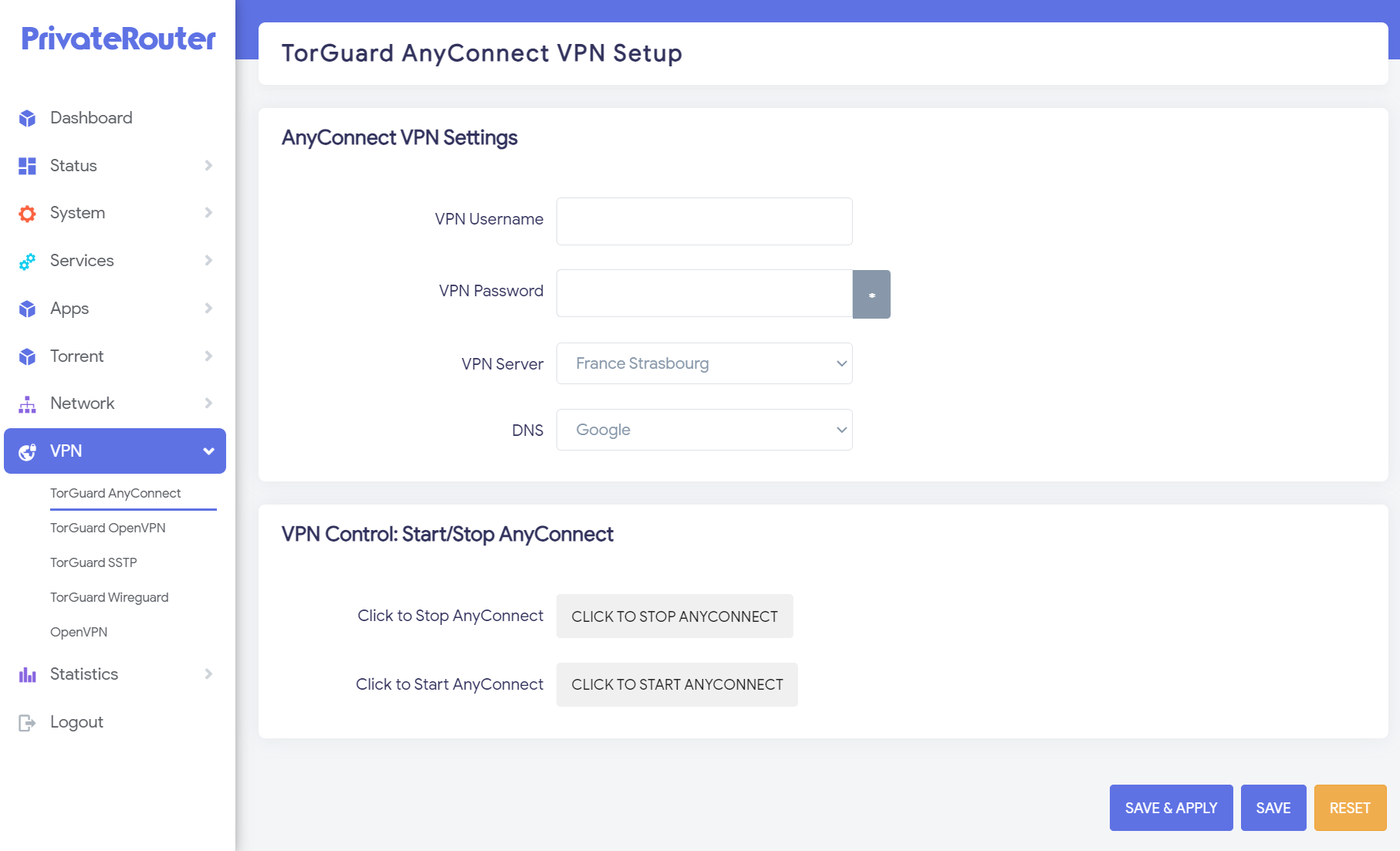
The TorGuard AnyConnect app is an innovative solution built for OpenWRT, leveraging the open-source implementation of the "OpenConnect" protocol. This remarkable VPN protocol is often dubbed a "stealth" VPN protocol because it connects to the network via port 443. The significance? Well, port 443 is the standard port used for encrypted SSL (Secure Sockets Layer) traffic, which means that any data passing through appears just like regular, everyday internet traffic. This effectively makes it a herculean task for DPI (Deep Packet Inspection) firewalls and censorship efforts to block it.
We are well aware that OpenWRT can seem like a complicated beast for the average user. Getting the right packages and dependencies installed and properly configured can feel like navigating through a complex labyrinth. But here at TorGuard, we believe that everyone should have access to superior online privacy and security. That's why we've simplified the process to make it more accessible.
With the TorGuard AnyConnect app, leveraging the power of OpenConnect has never been easier. Forget about technical complexities; all you need to do is input your VPN username and password, select your preferred VPN server from the dropdown list, click save, and voila! You are now connected and enjoying the full benefits of a stealthy, secure, and robust VPN connection right from your router. The internet, as it should be, is at your fingertips.
TorGuard's SSTP VPN PrivateRouter app
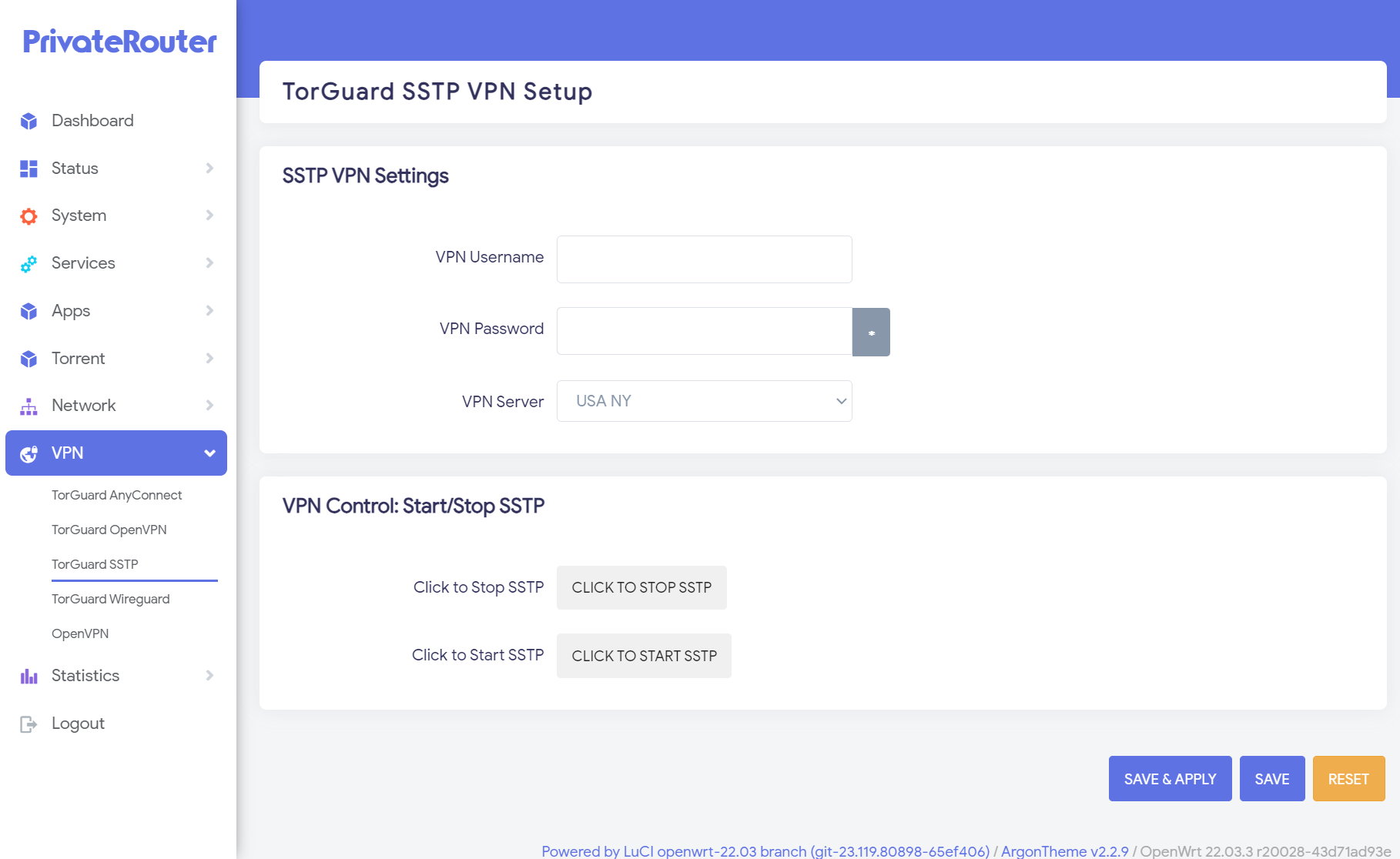
Among the multitude of stealth VPN tunnel options offered by TorGuard, SSTP stands out for its commendable speeds and performance on routers. While it might not match the velocity of WireGuard, SSTP definitely outpaces OpenVPN, offering plenty of bandwidth to accommodate the data needs of all your devices, and robust enough to handle content streaming without hiccups.
SSTP can be considered a somewhat tricky protocol to set up on OpenWRT. Given that this SSL VPN tunnel operates on non-standard ports, it usually necessitates some code modifications to ensure compatibility with TorGuard SSTP VPN. This complexity might deter less tech-savvy users or those seeking simplicity, but fear not - TorGuard has done the heavy lifting for you.
Our SSTP app is designed to streamline the connection process, making it extremely easy to leverage this powerful VPN protocol at the VPN router level. All it takes is a few steps: select your desired server location, enter your VPN password and username, and with a single click, you're connected. The TorGuard SSTP app essentially demystifies the technical complexities, making superior router-level VPN protection an easily achievable goal for all users.
TorGuard's OpenVPN PrivateRouter app
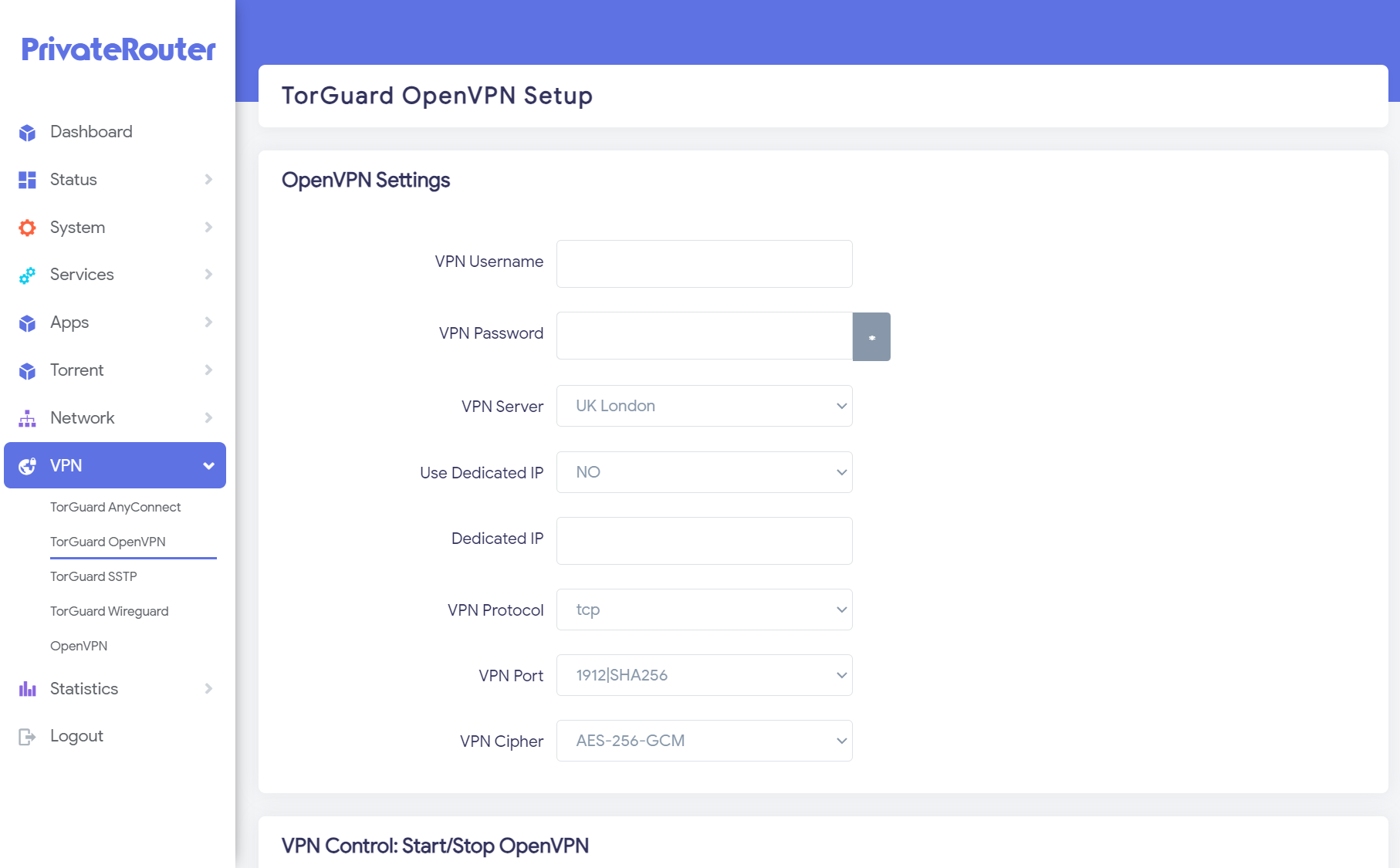
TorGuard's OpenVPN PrivateRouter App
Rounding up our new offerings is the steadfast classic of VPN protocols, OpenVPN. This is the battle-hardened choice that, while it might not always be the fastest option on your VPN router, definitely boasts the benefit of time-tested reliability and a plethora of customizable connection options.
Historically, configuring OpenVPN involved uploading individual configuration files, making adjustments to suit your desired cipher or port, or wading through a sea of options. Well, those days are now firmly in the past. Want to utilize your residential dedicated IP add-on? It's as straightforward as a click. With our OpenVPN app, you have full control over choosing your VPN server, dedicated IP, protocol, port, and cipher without the fuss of manual configuration.
Matching the functionality of our Desktop and Mobile VPN apps, the OpenVPN app for OpenWRT PrivateRouters presents a familiar interface, allowing you to experiment with various options and optimize your VPN setup. Whether you're trying to find the fastest protocol and cipher for your particular VPN router or setting up a residential IP add-on (a simple process of pasting the IP and flipping the Dedicated IP switch to ON), it's never been easier.
We're excited to announce that with the introduction of TorGuard's new OpenVPN app, configuring OpenVPN on a VPN router is no longer a daunting task. We've designed the app to streamline the connection process, effectively transforming a once complicated operation into a user-friendly experience. After all, time saved is money saved, and who wouldn't want a little extra of both? Enjoy the familiarity, flexibility, and convenience of our OpenVPN app on your OpenWRT-powered PrivateRouter.
PrivateRouter is The Ideal VPN Router OS
As we wrap up, it's vital to underline the significance of running a VPN tunnel on a physical Wi-Fi access point, a practice that can profoundly augment both personal and corporate internet security. With the advent of our new OpenWRT VPN apps for TorGuard, this process has never been simpler or more convenient. From securing multiple devices simultaneously to ensuring unblockable access to your favourite content and applications, we're empowering our users to take their online safety to a new level.
And if these new offerings weren't exciting enough, keep your eyes peeled for an upcoming sale and a TorGuard-exclusive contest. We're going to make the internet a safer place, one router at a time, by giving away thousands of dollars worth of VPN routers in a randomized raffle!
Current PrivateRouter users can start enjoying these innovative VPN apps immediately. If you've rebooted your router recently, you may have noticed these new options. If not, simply navigate to the System/Software section, and search for tganyconnect, tgsstp, or tgopenvpn to manually add these features to your PrivateRouter OS device. And for those of you running mainline OpenWRT on your own router, don't worry. Contact our friendly helpdesk, and we'll provide you with the necessary ipk file to get you onboard.
For anyone interested in purchasing a pre-flashed VPN router, check out PrivateRouter.com. What makes PrivateRouter OS special? It's the expandable storage. The limitation of onboard storage in most high-grade routers has been a major hurdle in adopting multiple VPN protocols. But, with PrivateRouter's expandable storage builds, you'll have ample space to install our comprehensive suite of VPN offerings and still have room for other packages or apps. Plus, PrivateRouter OS comes with anywhere from 30GB to 500GB of extra network storage, turning your VPN router into a secure mini NAS solution for SMB or NFS file sharing.
Stay tuned for more exciting updates and remember: with TorGuard and PrivateRouter, you're not just getting a VPN, you're getting peace of mind.