
As we navigate through our interconnected world, the pursuit of online privacy and security is becoming increasingly paramount. Ads, while seemingly harmless, often harbor trackers that trace our internet activities. Moreover, malicious players exploiting rogue ad networks can even deliver harmful malware, compromising our devices. With these concerns in mind, we've meticulously selected the top Pi-hole block lists for 2023. These lists serve as a potent shield, offering a safer and more streamlined web browsing experience.
First, let's briefly touch upon what Pi-hole is for those who are new to it. Pi-hole is a lightweight, open-source network-wide ad blocking application. It leverages DNS sinkholing to prevent unwanted content and advertisements from loading, thereby enhancing online security, improving network performance, and creating a cleaner browsing experience. TorGuard offers private Pi-Hole service that is compatible with our Anonymous VPN and Private WireGuard services. To strengthen its utility, Pi-hole utilizes what are called 'block lists'—collections of domains known to host advertisements, trackers, or malicious content.
However, identifying which block lists to add can be a daunting task given the sheer number available. But fret not, as we've sifted through the noise and compiled an authoritative list of the most effective Pi-hole block lists for the year 2023.
Steven Black's Unified Hosts + Gambling + Porn + Social
Steven Black's consolidated block lists remain an invaluable resource for any Pi-hole setup. By synthesizing data from some of the most reliable sources, it offers comprehensive protection against ads, trackers, fake news, gambling, adult content, and social media annoyances.
OISD Basic
OISD is renowned for being a judiciously curated block list that strikes a fine balance between blocking unwanted content and preventing overblocking of essential websites. Its 'basic' version is an excellent choice for users looking for broad protection with minimal interference with regular internet usage.
Energized Blu
Energized Blu is a meticulously compiled list providing a safe browsing experience by blocking ads, trackers, and malicious domains. It is a more lightweight version of the Energized pack, which makes it an ideal choice for users who want a significant degree of protection without putting too much strain on their devices or network.
AdGuard DNS Filter
The AdGuard DNS Filter, produced by the same team behind the popular AdGuard ad blocker, is a frequently updated and reliable block list. With over 25,000 rules, it blocks ads, counters, trackers, and malicious websites, effectively ensuring a secure and smooth browsing experience.
The Block List Project Lists
The Block List Project provides a collection of free and frequently updated block lists dedicated to targeting and preventing a range of unwanted content. From ads and malware to phishing and ransomware attacks, each list focuses on a specific category, allowing for a highly customized Pi-hole setup.
AnudeepND's Blacklist
AnudeepND's Blacklist provides a comprehensive list of ad-serving domains, especially focusing on mobile ads. It's a great choice if you're looking to reduce ads on smartphones and other mobile devices.
URLHaus Malicious URL Blocklist
As the name suggests, URLHaus Malicious URL Blocklist, hosted by abuse.ch, targets domains hosting malware, providing an extra layer of security for your network.
Firebog's Ticked Lists
Firebog provides a carefully selected compilation of block lists known as 'The Ticked Lists'. These lists exclude any false positives, providing an efficient and balanced ad blocking experience.
WaLLy3K's BLock Lists
WaLLy3K maintains a curated list of block lists for Pi-hole that is recognized for its thoughtful organization. These lists provide well-rounded coverage, offering a blend of protection against advertisements, trackers, and malicious sites.
Phishing Army Blocklist
The Phishing Army Blocklist aims to tackle phishing attempts head-on. Updated daily, it focuses on domains involved in phishing scams, adding an additional layer of safety while browsing.
Lightswitch05's Ads & Tracking List
This blocklist, managed by Lightswitch05, is a meticulously maintained and highly effective tool in reducing ads and tracking requests. It helps minimize intrusions and enhance privacy without causing significant disruptions in your browsing.
D3ward's AdBlock List
D3ward's AdBlock list offers a comprehensive and balanced blocklist focusing on ads, tracking, and telemetry data. It strikes a balance to provide a significant reduction in unwanted content without overblocking.
KADhosts
KADhosts, maintained by Polish project KAD, concentrates on blocking fraud, scam, and phishing sites, primarily focusing on Polish language sites but also offering extensive international coverage.
EasyList and EasyPrivacy
EasyList and EasyPrivacy are widely used and recognized for their effectiveness in ad blocking and privacy protection, respectively. They both are essential additions to any Pi-hole setup, particularly for users who prioritize privacy.
NoCoin Filter List
As the digital currency space expands, so does the proliferation of cryptocurrency mining malware. The NoCoin Filter List steps in to block browser-based crypto miners, making it an increasingly crucial part of a Pi-hole setup.
How to Add Your Chosen Blocklist to Pi-Hole
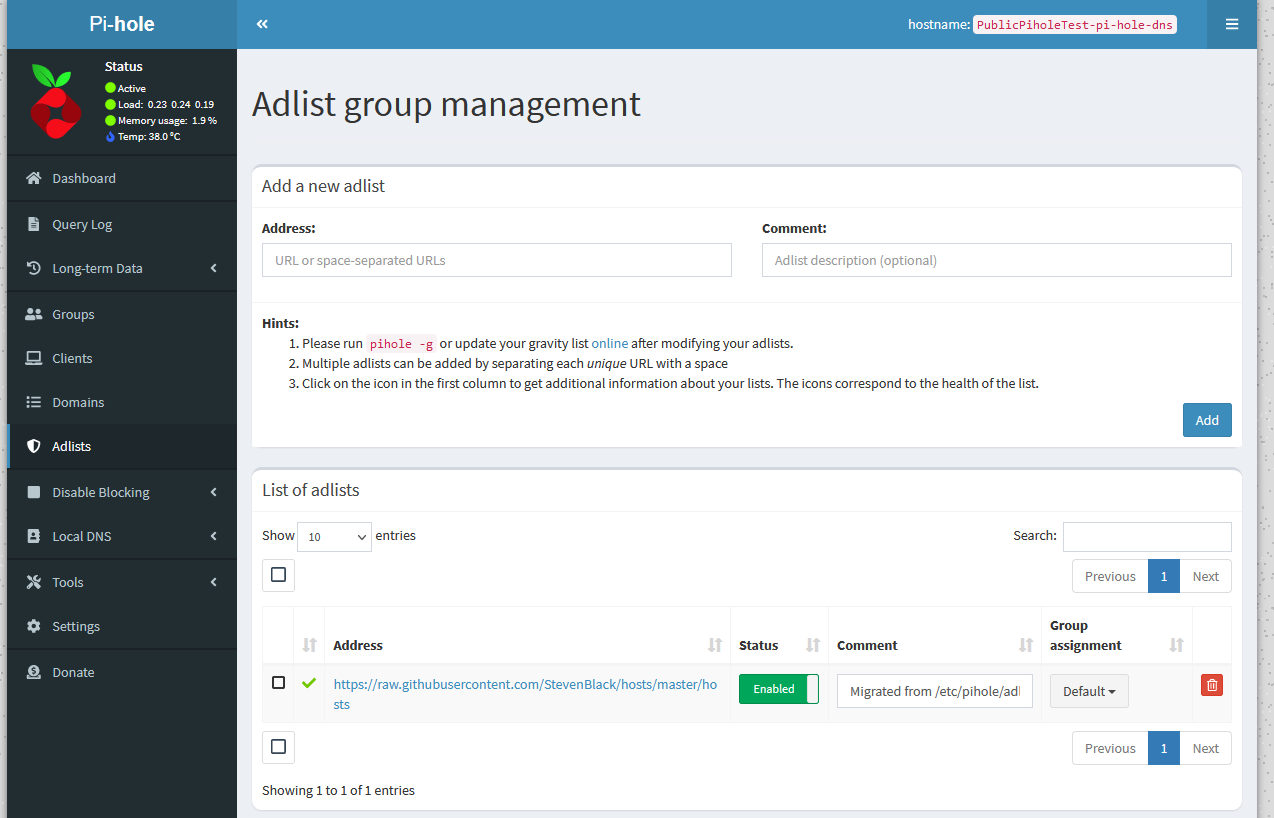
Once you've chosen your preferred block list, the process of incorporating it into your Pi-hole setup is remarkably straightforward. Simply right-click on the URL of the desired block list and select "Copy" from the context menu. Next, navigate to your Pi-hole admin interface—usually accessible via the link in the TorGuard Member's area —and click on "Group Management" in the left-side menu, then select "Adlists." Here, you'll find an empty box labeled "Address." Right-click in this box and select "Paste" to insert the copied URL. You'll also see a section labeled "Comment"; it's good practice to enter the name or a brief description of the list here for future reference. Once you've inputted all necessary information, click on the "Add" button at the bottom of the page. Voila! You've successfully added a new block list to your Pi-hole. It's essential to update your gravity after adding new lists, which can be done by navigating to "Tools" and then "Update Gravity." This process ensures your Pi-hole starts blocking the domains listed in your newly added block list.
Less is More
In the realm of Pi-hole block lists, the saying "less is more" often holds true. While the idea of adding an abundance of block lists may seem appealing, it's essential to recognize that overblocking can inadvertently obstruct legitimate content, leading to a less-than-ideal browsing experience. Therefore, it's critical to consider your specific goals before adding any block lists. Are you aiming to block adult content? Or perhaps your priority lies in thwarting phishing domains or halting trackers in their tracks? Each objective would benefit from a targeted block list specifically curated to address that particular concern. Remember, the default block list that comes pre-loaded with Pi-hole is frequently updated and works exceptionally well for general ad-blocking purposes. So while we've provided an extensive selection of block lists in this tutorial, we don't recommend indiscriminately adding them all. Instead, pick and choose the ones that align with your needs and priorities. That said, if you're feeling adventurous and wish to experiment with a wider array of block lists, by all means, go ahead! Just remember to monitor your network behavior and adjust your lists accordingly to strike the right balance.
With these block lists at your disposal, customizing your Pi-hole setup to suit your specific needs becomes a much less daunting task. The challenge is to strike the right balance between blocking undesirable content and ensuring legitimate content isn't inadvertently blocked. It's important to remember that more isn't always better when it comes to block lists—accuracy and specificity are key.
Keeping your block lists updated is also crucial, as new ad-serving and malicious domains pop up every day. Most block lists update frequently, so set your Pi-hole to fetch these updates regularly. As we move further into the year 2023, these block lists will continue to serve as potent tools in enhancing online privacy and security.
Whether you're an individual trying to enjoy a cleaner browsing experience or a system admin striving to secure a network, the right selection of Pi-hole block lists can make a significant difference. Here's to safer, smoother, and more enjoyable browsing in 2023!