


Providing internet access during times of need can be an invaluable service. If you’ve seen advertisements for VPNs, you may have heard about the dangers of public Wi-Fi. While it’s true that using a VPN on unsecured networks is a wise move, modern websites often utilize SSL encryption, which protects your personal information from casual interception. However, this post isn’t about the risks of public Wi-Fi—it’s about the benefits, specifically how you can help your community by offering a secure, free Wi-Fi hotspot.
In the wake of recent storms across the southeastern United States, many communities were left without power and communication for extended periods. When fiber, cable, and mobile networks are down, those with access to alternative internet sources—like Starlink—can become vital lifelines. By using these connections to create a free Wi-Fi hotspot, you can help neighbors stay connected in emergencies. But how can you extend a secure Wi-Fi signal over a wide area? That’s where projects like LibreMesh and VPN services like TorGuard come into play.
What is LibreMesh?
LibreMesh is an open-source project designed to simplify the deployment of community mesh networks. It’s built on OpenWrt, an open-source router firmware, and allows users to turn compatible routers into nodes within a mesh network. This makes LibreMesh ideal for projects where traditional cabling isn’t practical, such as rural areas or temporary setups.
A mesh network is essentially a decentralized Wi-Fi network where multiple routers (or nodes) work together to extend coverage. Unlike standard Wi-Fi setups that rely on one central router, a mesh network spreads the signal over a wider area by creating multiple connection points. This way, even devices far from the primary access point can still connect to the internet.
Why Use a VPN for Free Wi-Fi Hotspots?
Sharing your internet connection with the public can raise security and privacy concerns, especially if you're sharing your personal IP address. This is where using a VPN, like TorGuard, becomes essential. By routing your internet traffic through a VPN server, you ensure that users on your free Wi-Fi network are assigned the VPN’s IP address, not your own. Additionally, TorGuard’s NAT firewall provides an extra layer of security, preventing unauthorized access to your personal network.
In our testing, OpenVPN over Starlink worked particularly well for this purpose. OpenVPN’s robust encryption and UDP protocol ensure both secure and reliable performance, even with satellite internet’s variable latency. However, WireGuard can also be used if you prioritize speed over compatibility in low-coverage areas.
Building a Mesh Network with LibreMesh and TorGuard
Setting up a community Wi-Fi hotspot using LibreMesh and TorGuard VPN is relatively straightforward. Here’s what we used in our testing using affordable hardware:
- Hardware: Banana Pi R64 (Gateway), x2 GL.iNet GL-AR300M (nodes), and x2 GL.iNet GL-AR750S (nodes).
- Network Source: Starlink for primary internet access.
- VPN: GL.iNet GL-B1300 running TorGuard OpenVPN for IP security and NAT Firewall.
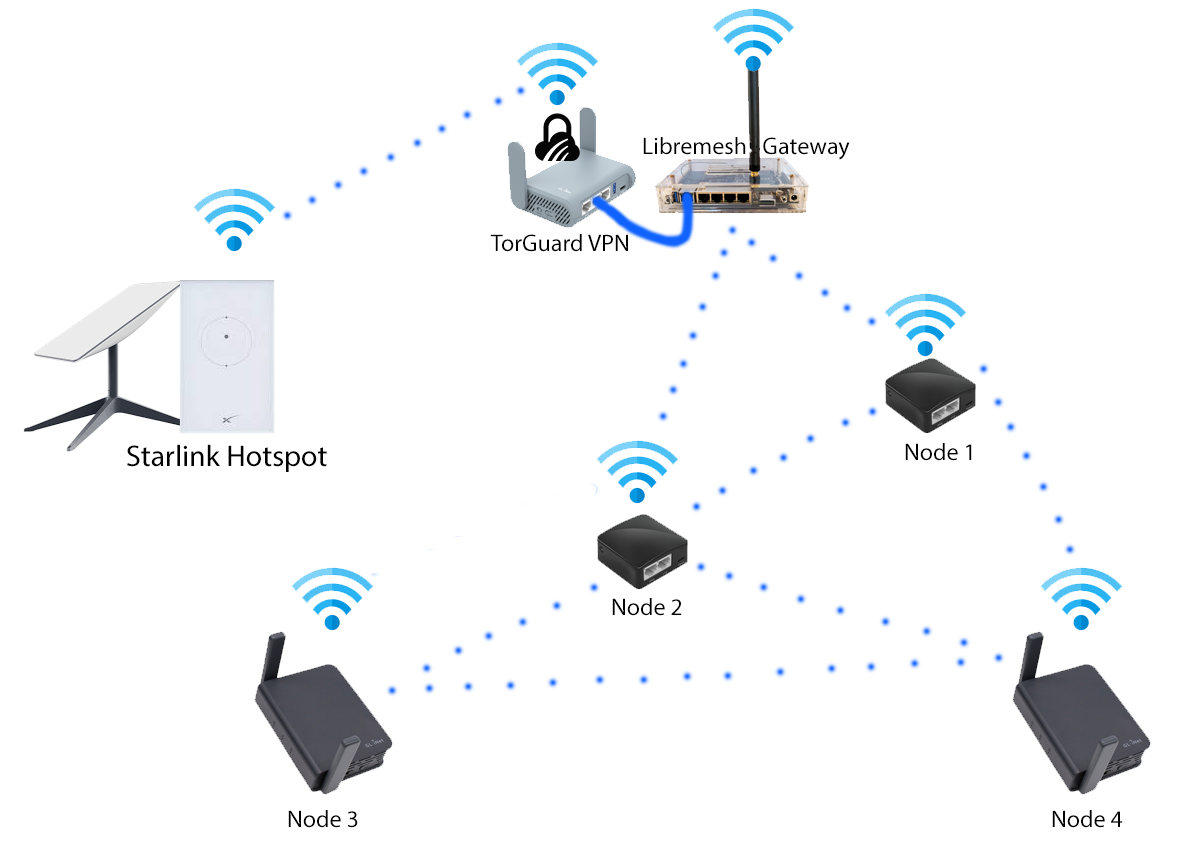
Here’s how the system works: The Starlink router provides the internet connection, but its range is limited. A secondary router, running OpenWrt and configured with TorGuard OpenVPN, connects to Starlink via Wi-Fi. This router then shares the internet connection via Ethernet with a LibreMesh-enabled router acting as the gateway node. Additional LibreMesh routers are distributed across the area to extend the Wi-Fi signal.
In our tests, this setup extended a single Starlink connection across a mesh network covering over 100 yards, all for around $100 in hardware costs. The LibreMesh routers connected seamlessly, allowing us to provide a stable, secure Wi-Fi signal far beyond the reach of the Starlink router alone.
Out-of-the-Box Functionality with LibreMesh
LibreMesh’s ease of use was a pleasant surprise. Once flashed onto supported routers, the system worked almost immediately, with minimal configuration needed. The latest LibreMesh RC2 build automatically broadcasts a roaming access point (AP), identifies nearby nodes, and connects to the internet-enabled gateway. The setup is so simple that community Wi-Fi networks can be deployed, moved, or modified on the fly.
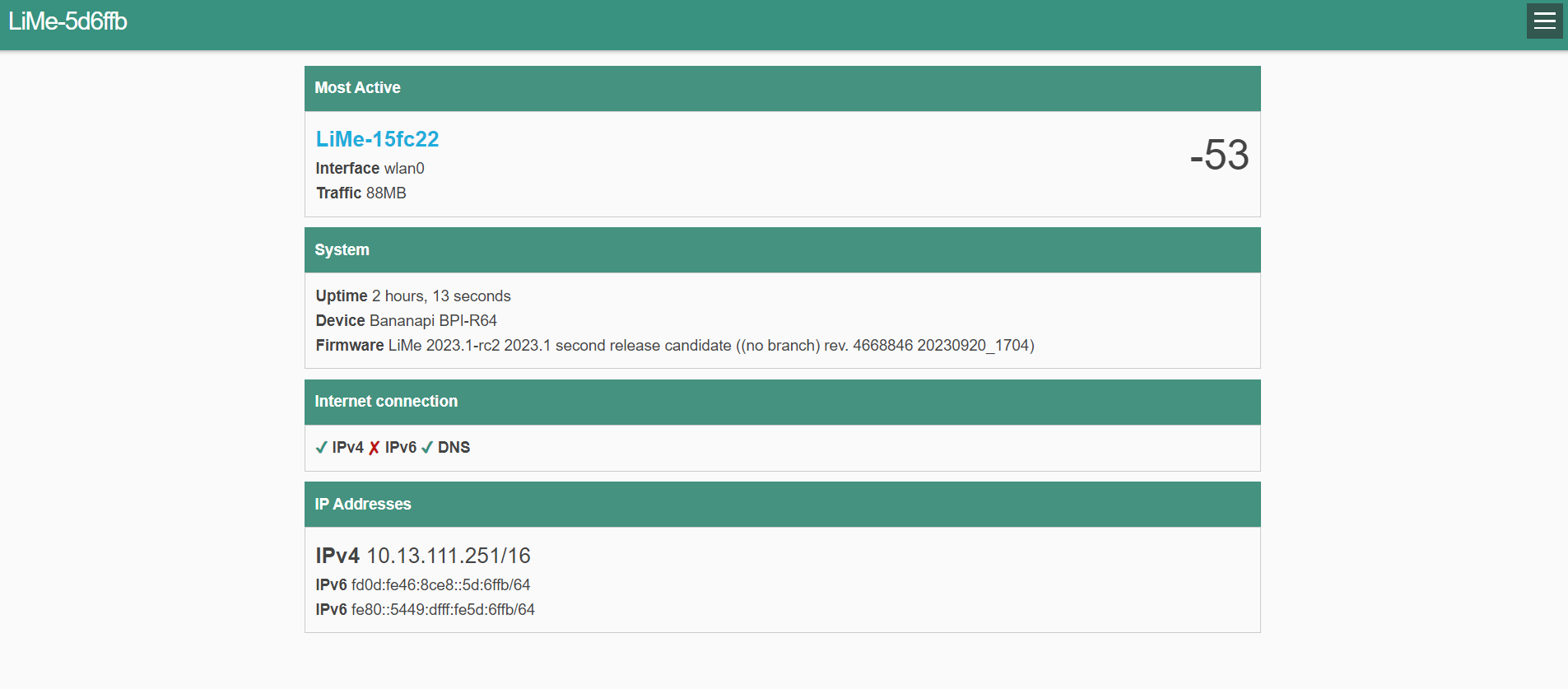
LibreMesh’s user interface is minimalist by design, streamlining the setup process. Each node broadcasts a secondary AP for management, and can also be accessed via SSH. Additional features, like network welcome screens or token-based access, can be configured, though by default, all nodes broadcast an open AP. Multiple internet gateways can be added to improve reliability and load balancing, especially for larger networks with many users.
Performance Testing: VPN, Mesh, and Speed
When sharing your bandwidth via a public hotspot, you don’t have to expose your personal IP address. In our setup, TorGuard’s OpenVPN handled this by masking the gateway node’s IP. While WireGuard also works well, we found OpenVPN to be more reliable with Starlink, likely due to satellite internet’s higher latency. The inherent speed limit of OpenVPN also prevents heavy use from overwhelming your main internet connection, as the VPN limits speeds to the tunnel’s capacity.
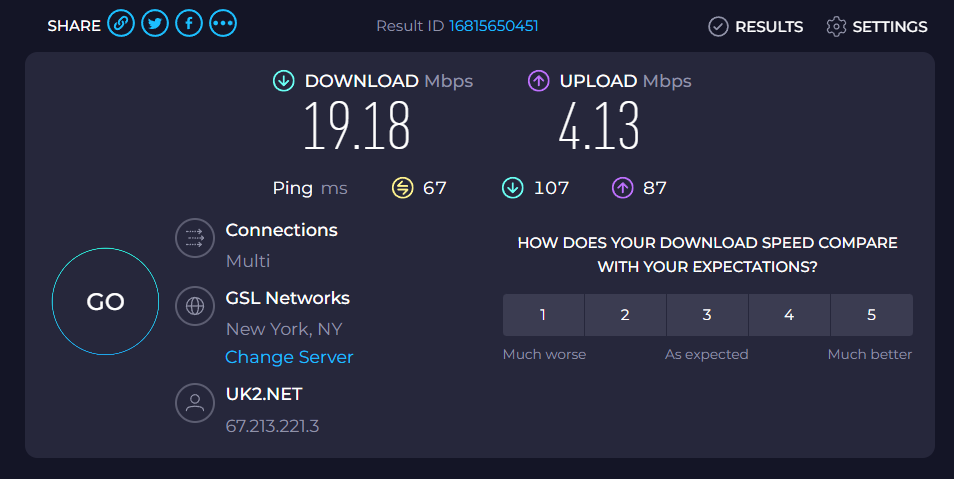
In our tests with a GL.iNet BL1300 router, we achieved reliable OpenVPN speeds over mesh of around 20 Mbps—more than enough for basic browsing and communication. Speeds varied slightly across nodes, with a small drop-off as distance from the gateway increased. Even at over 100 yards away, speeds remained usable at around 5 Mbps, sufficient for essential communication from a single access point.
For larger networks serving 150+ users, LibreMesh distributes client connections across multiple devices and gateways, ensuring no single access point is overwhelmed. This scalability makes it a practical solution for community-wide internet sharing, especially in areas with limited infrastructure.
Why aren't you running a Free Wi-Fi hotspot?
With the combination of LibreMesh and TorGuard VPN, you can create a secure, reliable, and scalable free Wi-Fi network for your community. Whether it’s for emergency communication during a natural disaster or simply to provide internet access in underserved areas, this solution is both affordable and effective.
So, the next time your community faces a communication blackout, ask yourself: Why aren’t you running a free Wi-Fi hotspot?